

Adobe Color CC screenshots (6)
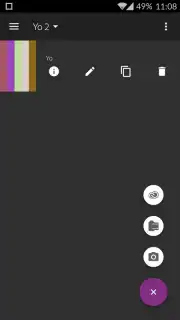
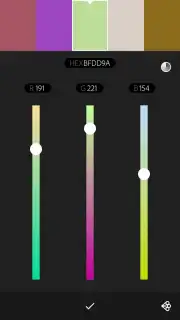
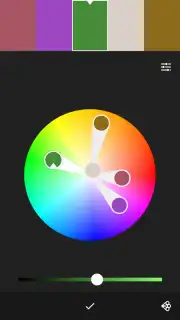



Description Adobe Color CC
Capture Your World in Color, Instantly
Ever see a stunning sunset, a vibrant street mural, or a beautifully arranged plate of food and wish you could capture that exact color scheme for your own designs? You know that feeling—the perfect palette is right in front of you, but translating it into usable digital colors feels like a chore. What if you could extract professional color themes from anything you see, in just seconds, using the device already in your pocket?
Adobe Color CC transforms your Android camera into a powerful color discovery tool. Simply point your camera at any object, scene, or texture, and the app intelligently generates a harmonious color palette live on your screen. You are not just taking a photo; you are conducting a color extraction. The magic happens in real time, pulling the most prominent and complementary colors directly from your viewfinder. This process turns the world around you into an endless source of inspiration, eliminating the guesswork from color selection.
Once the app creates that initial palette, you have complete creative control. You can manually adjust any color in the theme with precision, tweaking the hue, saturation, and brightness until it perfectly matches your vision. After finalizing your custom palette, you save it directly to your device. The seamless integration comes next: with one tap, you can sync that palette to your Adobe Creative Cloud account. This means the colors you captured on your phone are instantly available within Adobe Photoshop on your desktop, creating a fluid, uninterrupted workflow from inspiration to execution. The app serves as a perfect companion for Photoshop users, enabling you to build personalized, photo-specific color schemes wherever you are.
- Live Camera Color Extraction: Generate beautiful, harmonious color palettes instantly by pointing your camera at any object or scene.
- Full Manual Color Adjustment: Precisely tweak every hue, saturation, and brightness value in your captured palette for perfect customization.
- Cloud Sync with Adobe Photoshop: Save palettes to your device and sync them directly to your Adobe Creative Cloud for use in desktop applications.
This tool effectively removes the barrier between the colors you love in the real world and the colors you use in your digital projects. The process from capture to implementation becomes incredibly streamlined, saving you significant time and elevating the personal relevance of your design work. You move from being an observer of color to an active curator, building a library of themes drawn directly from your life and environment.
Download the Adobe Color CC mobile app now—exclusive access for the first users to integrate this powerful tool into their creative workflow!
Heads up: you'll need wifi for syncing palettes to Adobe Creative Cloud. Some advanced creative features within the broader Adobe ecosystem require separate access.
Information
| Version | 1.3 |
| Developer | Adobe |
| Updated | 17.03.2026 |
| Size | 10.59 MB |
| Package | com.adobe.creativeapps.colorapp |
| Signature | d34354cc4fea9d54da99a5ee4810c9d7 |
| Architecture | armeabi, armeabi-v7a, mips, x86, arm64-v8a, mips64, x86_64 |


