


Adobe Spark Post screenshots (10)






Description Adobe Spark Post
Looking for a professional-grade graphic design tool that operates from your pocket without demanding desktop software expertise? Adobe Spark Post provides a streamlined mobile workflow for creating social media graphics, marketing materials, and custom images using a template-driven, intuitive editor.
Core Functionality and Workflow
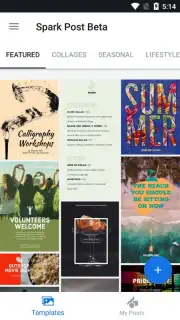
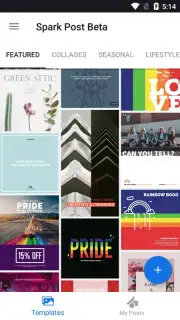
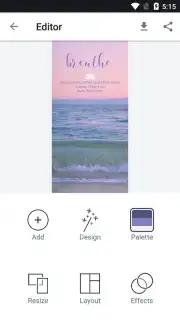
The application centers on a vast, categorized template library. Users initiate a project by selecting a layout relevant to themes like business, travel, or food. The editing suite then allows for direct manipulation of all core design elements: the background image can be swapped from a local library or integrated stock service, color palettes are adjustable per component, and text boxes support custom fonts and formatting. The process is inherently non-destructive, permitting endless revisions before final export. A key operational feature is cloud synchronization via an Adobe ID; this maintains a persistent, cross-device library of all projects, ensuring work begun on a phone can be later accessed and modified from a tablet or web browser.
Analysis of Tools and Output
Beyond basic customization, the toolset includes automated design functions. The 'Resize' feature can repurpose a single design into format-specific versions for various social platforms (e.g., Instagram Story, Twitter Post) with one tap. Typography controls are robust for a mobile app, offering font pairing suggestions and advanced text layout options. The final output is rendered in high-resolution formats suitable for both digital sharing and professional printing. While the core creation engine is free, access to the full premium asset library—including exclusive templates, Adobe Fonts, and premium stock images—requires a subscription.
- Template-Driven Design System: Start with thousands of professionally made layouts for social posts, flyers, and stories.
- Comprehensive Visual Customization: Replace images, alter color schemes, and edit all text with precise typography controls.
- Cloud-Based Project Synchronization: Save and access every design across devices seamlessly with an Adobe account.
- One-Tap Multi-Format Resizing: Automatically adapt a single graphic for different social media platforms and dimensions.
- Direct Social Media Publishing: Export and share your finalized graphics directly to connected networks from within the app.
Start creating professional visuals in minutes and elevate your social media presence. Download the Adobe Spark Post mobile app now to claim your design advantage.
Heads up: you'll need wifi for most features. Some cool stuff is extra, like the full premium template and stock photo library.
Information
| Version | 30.8.0 |
| Developer | Adobe |
| Requirements | Android Android 10+ |
| Updated | 14.09.2026 |
| Size | 233.45 MB |
| Package | com.adobe.spark.post |
| Signature | 45554baa0c352c00885cf299e337ae8c109e33f1 |
| Architecture | arm64-v8a |


