

Computer Launcher screenshots (7)
Description Computer Launcher
Transform Your Smartphone into a Windows 10 PC
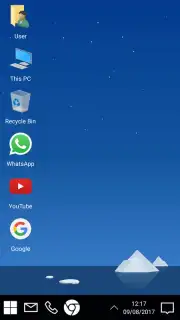
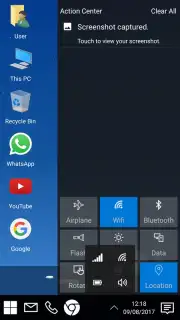
Tired of the same old smartphone grid? Imagine unlocking your phone and being greeted not by familiar icons, but by the powerful, desktop-class interface of a Windows 10 computer. That’s the immediate reality with Computer Launcher. This isn't a simple theme; it's a complete system transformation that replaces your Android environment with an incredibly detailed simulation of a PC desktop, right down to the iconic Start button and taskbar. The effect is genuinely surprising, turning every interaction into a novel and satisfying experience that makes your device feel profoundly more capable and organized.
A Deep Desktop Experience, Not Just a Skin
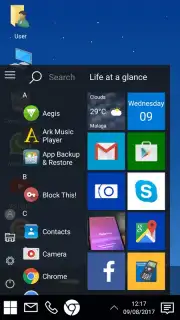
Computer Launcher goes far beyond changing wallpapers and icons. It rebuilds your phone’s interaction model from the ground up. The central Start Menu becomes your true command center, providing instant access to every installed app, all launcher settings, and even a direct device shutdown button—just like on a real PC. You’ll find yourself instinctively looking to the lower-left corner for the time and notifications, creating a seamless mental shift from a mobile device to a productivity workstation.
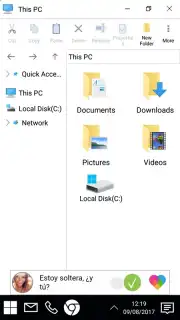
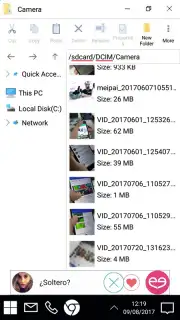
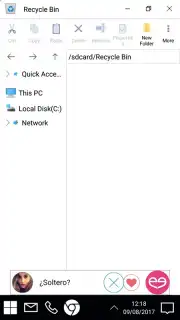
The innovation continues with a completely redesigned file management system. The standard Android file browser is replaced by a precise replica of the classic ‘My Computer’ window. This familiar layout grants you rapid, intuitive access to all your documents, downloads, images, and media. You can browse, open, and manage files using the same visual logic and organization you’ve always used on a desktop, eliminating the learning curve of mobile file systems and bringing a powerful sense of control to your fingertips.
- Complete Windows 10 Interface: Features an accurate Start Menu, system tray with clock, notification center, and a classic desktop-style taskbar for seamless navigation.
- Advanced PC-Style File Manager: Navigate your device storage through the familiar ‘My Computer’ interface, enabling efficient file browsing and management identical to a Windows environment.
- Turbo Performance & Ad-Free Experience: Enjoy a fluid, responsive launcher optimized for speed. The Turbo feature enhances performance while ensuring the interface remains completely free of intrusive advertisements.
- Total System Integration: The launcher transforms the core user experience, affecting the home screen, app drawer, and system tools for a consistent and immersive desktop metaphor.
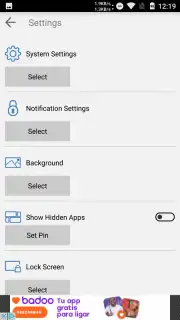
- Customization and Control: Access comprehensive settings via the Start Menu to personalize your virtual desktop, from visual details to functional behaviors, tailoring your computer experience.
This launcher is the definitive alternative for anyone bored with conventional mobile layouts. It provides a radically new way to interact with your smartphone, offering the unique sensation of running a full Windows desktop in your pocket. It’s designed for users who crave efficiency, nostalgia, or simply the powerful, organized feel of a computer interface on their mobile device.
Claim Your Desktop Advantage Now
Stop scrolling through basic icons. Step into a more powerful and organized digital workspace. Download Computer Launcher now and instantly transform your Android device into a sleek Windows 10 computer. Experience unparalleled control and a fresh, exciting way to use your phone every day.
Disclaimer: This application requires an internet connection for initial download and potential updates. The app is free to use; optional in-app purchases may be available for advanced features or themes. The product is an Android launcher application and is not affiliated with or endorsed by Microsoft Corporation.
Information
| Version | 12.9 |
| Developer | BlueThemes Studio |
| Requirements | Android Android + 4.1, 4.1.1+ |
| Updated | 17.03.2026 |
| Size | 8.22 MB |
| Package | com.computer.desktop.ui.launcher |
| Signature | 42e53d2b55f2428b69bce4ca60df16f6 |
| Architecture | armeabi-v7a, mips, x86, arm64-v8a, x86_64 |


