

Coolmuster Android Assistant screenshots (1)
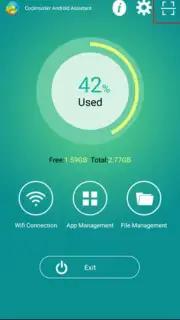
Description Coolmuster Android Assistant
Tired of Your Phone Feeling Like a Cluttered, Slow-Moving Puzzle?
Managing everything on your Android device can quickly become a chore. You find yourself jumping between different apps just to move a photo, hunting for a specific message backup, or feeling your phone lag as storage fills up. It’s frustrating when your essential tool doesn’t work with you. What if you had a single, powerful command center on your computer to take full control? Imagine seamlessly transferring years of memories, installing new apps in bulk, or cleaning out digital junk without ever touching your phone’s tiny screen. That’s the streamlined experience waiting for you.
Your Desktop Command Center for Everything Android
Coolmuster Android Assistant acts as a powerful bridge between your computer and your Android device. Once connected, your phone’s entire universe is organized and accessible from a large, intuitive desktop interface. This isn’t just a simple file transfer tool; it’s a comprehensive management suite designed to give you effortless mastery over your data and device performance.
You can browse and manage every category of content as if it were a folder on your PC. View all your contacts in a clear list and edit details with a keyboard. See your entire message history, from texts to WhatsApp conversations, and export them for safekeeping with a few clicks. Your photo library, music collection, videos, and documents are all laid out for easy preview, selection, and transfer in either direction. Beyond media, you gain the power to install or uninstall multiple apps at once, back up your entire device state, and restore it to a new phone, eliminating the dread of switching devices. The assistant also provides a clear overview of your phone’s storage, helping you identify and remove bulky, unnecessary files to reclaim space and speed up performance directly from your computer.
Why This Becomes Your Go-To Management Tool
The true advantage lies in the convenience and depth of control. Instead of using a tangled web of cables and unreliable methods, you get a stable, fast, and visual way to handle everything. The interface is clean and logically grouped, so you’re never lost looking for a function. It turns complex tasks like full-device cloning or batch operations into simple, stress-free processes. You save hours of time and gain peace of mind knowing your data is organized, backed up, and easily accessible from a single, reliable hub.
- One-Click Complete Phone Backup & Restore
- Cross-Platform File & Media Management
- Batch Install & Uninstall Apps from PC
- Clear Storage & Boost Performance Tools
Download Coolmuster Android Assistant Now
Stop wrestling with your phone’s limitations. Take command from the comfort of your computer and transform how you manage, protect, and enjoy your Android device. Consider downloading Coolmuster Android Assistant to experience effortless, large-scale control.
Heads up: you'll need a Windows or Mac computer and a USB connection for full functionality. Some advanced backup and restore features may require the full version.
Information
| Version | 5.3.21 |
| Developer | Coolmuster |
| Requirements | Android Android + 6.0+ |
| Updated | 17.03.2026 |
| Size | 3.91 MB |
| Package | com.coolmuster.androidassistant |
| Signature | bbba63f286ccf2d97b2c7a82077801c2 |
| Architecture | universal |


