


Dulux Visualizer IN screenshots (5)

Description Dulux Visualizer IN
The Problem with Choosing Paint Colors
Selecting the perfect paint color remains one of the most daunting steps in any home improvement project. Traditional methods—relying on small paper swatches, purchasing sample pots, and applying test patches—are inherently flawed. These approaches fail to account for how light, shadow, and room dimensions dramatically alter a color's appearance, often leading to costly mistakes, wasted time, and disappointing results. The disconnect between a tiny color chip and the final wall surface is a persistent challenge for DIY decorators and design enthusiasts alike.
A Technical Analysis of Dulux Visualizer IN
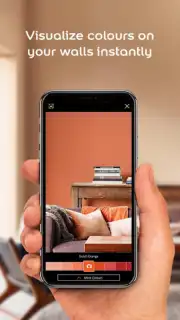
The Dulux Visualizer IN app addresses this core problem by functioning as a sophisticated augmented reality (AR) and image-processing tool. It translates the abstract concept of a color palette into a concrete, interactive visual experience directly within your living space. The primary mechanic involves using your device’s camera to superimpose high-fidelity digital paint onto real-world surfaces in real time. This is not a simple filter; the application uses advanced rendering to account for ambient light and texture, providing a surprisingly accurate preview that static swatches cannot match.
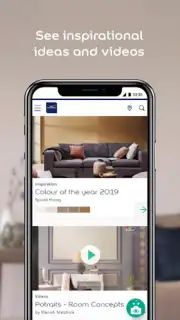
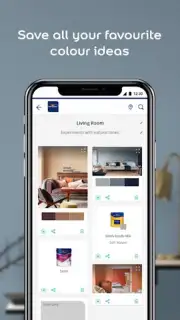
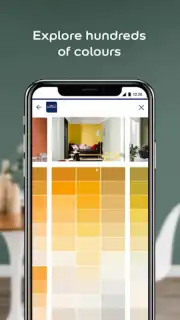
For devices without advanced motion sensors or for users planning from a distance, the Photo Visualizer mode offers a robust alternative. This feature allows you to upload or capture a static image of your room and digitally apply colors to the walls with precise brush controls. You can adjust the coverage, compare two shades side-by-side on the same image, and save multiple iterations for later review. Beyond visualization, the app serves as a direct portal to the complete Dulux product ecosystem. It provides access to the entire curated color library, complete with technical names, sheen information, and direct links to purchase the correct paint and materials, effectively bridging the gap between inspiration and execution.
A critical, often overlooked feature is the color capture tool. This utility allows you to use your camera to sample any color from your immediate environment—a fabric swatch, a piece of art, or a natural element—and match it to the nearest Dulux shade. This functionality transforms the world into your personal mood board, ensuring color schemes are cohesive with existing furnishings. Furthermore, the app facilitates a collaborative design process. Users can export high-resolution images of their visualizations, share them seamlessly with family, contractors, or interior designers, and solicit feedback within a shared visual context, streamlining decision-making.
- Real-Time AR Wall Painting: Visualize any Dulux color on your actual walls through live camera feed, with dynamic adjustments for lighting and shadow.
- Static Photo Colorization Engine: Apply and manipulate paint colors on uploaded room photos for precise planning and comparison.
- Comprehensive Product Database: Access the full Dulux color range, product specifications, and local purchasing options within the app.
- Environmental Color Capture Tool: Use your camera to sample colors from real-world objects and find the perfect Dulux match instantly.
- Project Sharing and Collaboration Features: Export and share high-quality visualizations to streamline feedback and finalize design choices.
Final Download Recommendation
For anyone serious about home decoration, this application transitions from a novelty to an essential utility. It de-risks the painting process by providing a level of preview fidelity that was previously inaccessible to consumers. The integration of practical tools—from color matching to product sourcing—within a streamlined interface makes it a centralized hub for renovation planning. It effectively eliminates the guesswork, turning a stressful decision into a confident, creative exploration.
Download the Dulux Visualizer IN mobile app now. This is more than an app; it's your exclusive access to a professional-grade design toolkit. For a limited time, leverage this technology to transform your space with absolute confidence—start your project today and see the difference before you ever open a can of paint.
Disclaimer: This application requires an internet connection for full functionality, including access to the color library and product database. Some features may require permissions to access your device’s camera and photo gallery. The app is intended for general informational and visualization purposes; actual paint colors may vary slightly due to screen calibration, lighting conditions, and surface preparation. Data usage applies. In-app features may link to external retailers for purchasing. Suitable for users aged 4+.
Information
| Version | 41.1.4 |
| Developer | AkzoNobel |
| Requirements | Android Android + 11+ |
| Updated | 17.03.2026 |
| Size | 53.72 MB |
| Package | com.cethar.dcs.duluxcolour |
| Signature | 1bff917e85cceb9f8f121a7af9a7f2a2 |
| Architecture | arm64-v8a |


