

Easy Subtitles screenshots (6)
Description Easy Subtitles
Never Struggle with Out-of-Sync Subtitles Again
Imagine settling in to watch your favorite foreign film or a gripping documentary, only to find the subtitles are a few seconds off. That jarring disconnect between the audio and the text completely pulls you out of the experience. You’re left constantly rewinding or trying to mentally adjust the timing, which turns a relaxing night into a frustrating chore. This common annoyance is now a problem of the past. Easy Subtitles hands you complete control over the subtitle files on your Android device, transforming you from a passive viewer into the director of your own seamless viewing experience.
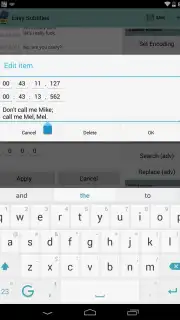
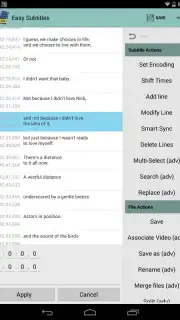
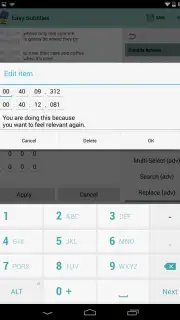
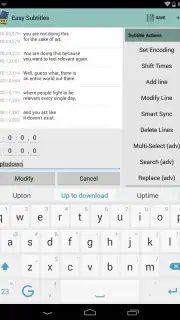
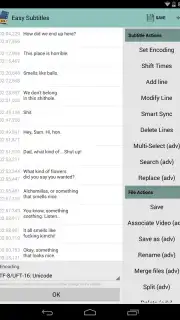
This powerful tool lets you edit subtitle files directly on your phone or tablet, eliminating the need for a computer. You are no longer dependent on pre-embedded subtitles that can’t be changed. Instead, you can download any SRT or SSA file and perfect it to match your video perfectly. The interface is designed for clarity, with the subtitle timeline taking center stage and an intuitive menu of options neatly accessible to the side. Every adjustment feels precise and intentional.
For those who demand a flawless, professional-grade result, the premium Turbo upgrade unlocks the ultimate feature. After meticulously editing your subtitles, you gain the ability to permanently embed them directly into your video file. This creates a single, portable video with perfect, inseparable subtitles, ready to be played on any device without worrying about separate files. The premium experience is also completely devoid of advertisements, offering an uninterrupted and focused editing environment.
What You Can Do with Easy Subtitles
- Edit Existing Subtitles: Correct spelling errors, improve translations, or reformat text directly within the app’s clean editing pane.
- Precise Timing Adjustment: Shift entire blocks or individual lines of subtitles forward or backward by milliseconds to achieve perfect synchronization with the dialogue.
- Add New Subtitles: Create custom captions from scratch for personal videos, home movies, or any content that lacks them.
- Complete Subtitle Removal: Delete any unwanted or incorrect subtitle entries with a single tap.
- Save in Multiple Formats: Work with and export the most common subtitle formats, including SRT and SSA, for maximum compatibility.
- Premium Embedded Subtitles: Unlock the ability to hardcode your edited subtitles directly into the video file, creating a permanent, unified media file.
- Ad-Free Editing Environment: Enjoy a clean, distraction-free workspace to focus entirely on perfecting your subtitles.
Take command of your media library and ensure every viewing session is perfectly synchronized. Stop compromising on broken subtitles and start creating the ideal experience.
Download Easy Subtitles now and sync your world perfectly.
Heads up: you'll need wifi for downloading subtitle files and videos. Some cool stuff like embedding subtitles is a premium feature.
Information
| Version | 2.3.1 |
| Developer | Didier Hoarau |
| Requirements | Android Android + 4.3+ |
| Updated | 17.03.2026 |
| Size | 4.36 MB |
| Package | video.tools.easysubtitles |
| Signature | 32df69a48b00a497261dd2aabb155cf9 |
| Architecture | universal |


