

File Converter With Preview screenshots (2)
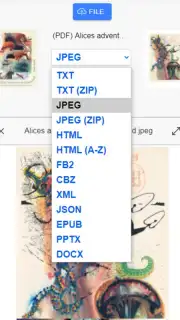

Description File Converter With Preview
Stop Letting Incompatible Files Lock Up Your Phone
You know the frustration. An important document arrives, but your phone can't open it. A cherished video from an old camera won't play. A project needs a different format, and you're stuck. Your device becomes a gallery of unreadable icons instead of a useful tool. This ends now. Imagine a single tool on your phone that doesn't just convert files, but lets you peek inside before you commit, ensuring every conversion is perfect the first time. That's the control you gain.
See Exactly What You're Converting, Every Single Time
Gone are the days of blind conversions. This tool puts a powerful preview window right at the heart of the process. Before you tap 'convert', you can view the contents of documents, scroll through PDF pages, see image thumbnails, or get the details of a media file. This means no more surprises—you confirm the right file and the right content, then transform it with confidence into the format you actually need.
The conversion engine itself is built for the broad, messy reality of digital life. It handles a vast array of formats, turning obstacles into opportunities. Need a PDF for a formal submission? Convert from Word. Need an image in a different size or type for a website? Transform it in seconds. Have an audio file that needs to be more universal? Change its format without losing quality. The app acts as your universal digital key, unlocking and reshaping your files to work wherever you need them to.
Why This Becomes Your Go-To File Solution
- Pre-Conversion Preview: Visually verify the contents of documents, images, and media files before initiating any conversion, guaranteeing accuracy and saving time.
- Wide Format Support: Seamlessly convert between a comprehensive range of formats for documents, images, audio, and more, directly on your device.
- Simple, Clean Interface: Navigate through conversion tasks with an intuitive design that focuses on your files, not on complicated menus or technical jargon.
- On-Device Processing: Your files are converted locally on your phone. This means faster processing for many tasks and enhanced privacy, as your data doesn't need to travel to an external server.
- Organized History: Keep track of your recent conversions in a built-in history tab, allowing you to easily find, reuse, or reconvert previous files without starting from scratch.
You might enjoy having this level of straightforward, visual control over your digital documents and media. Consider downloading File Converter With Preview to turn your phone into a capable, self-sufficient file workstation.
Heads up: you'll need wifi for initial setup and for some advanced conversion features. A stable connection ensures the best experience. Some premium formats and batch processing options may be available as extra features.
Information
| Version | 1.0.0.0 |
| Developer | tricode |
| Requirements | Android Android + 4.4+ |
| Updated | 17.03.2026 |
| Size | 848.78 KB |
| Package | app.web.fcwp_fc371.twa |
| Signature | ac96a00087808819b25bca1627b6b0ca |


