

Getube screenshots (5)



Description Getube
Imagine you've just found the perfect tutorial, a breathtaking travel vlog, or that song performance you want to keep forever. You hit play, but then the buffering icon appears, or you remember your commute tomorrow has no internet. That moment of frustration is exactly where your experience changes. Getube transforms how you interact with YouTube, turning any video into a permanent, offline asset on your device in moments. This isn't just a downloader; it's your personal media library curator, giving you true ownership over the content you love.
The genius of Getube lies in its seamless, familiar environment. You are not learning a new, complicated tool. From the moment you open the app, you are greeted by the exact layout and navigation of the YouTube platform you already know. This intuitive design means you can search, browse, and discover content exactly as you always have. The powerful difference is the discreet, ever-present download button. That familiar interface becomes a gateway to a permanent collection, removing the dependency on a stable internet connection for playback. The process is engineered for simplicity: locate your video, tap the download icon, and select your preferred quality. The app handles the rest, saving the file directly to your device's storage.
Core Features and User Workflow
Getube operates on a principle of effortless control. The entire download workflow is condensed into a few intuitive steps, putting you in command of your media's quality and storage.
-
Frictionless, Native Interface: You navigate a perfect replica of the YouTube environment. This eliminates any learning curve, allowing you to focus entirely on finding the content you want to save. The integration is so complete that it feels like an enhanced, official version of the app itself.
-
One-Tap Download Initiation: A prominent, clearly marked download button is positioned within the video interface. A single tap activates the download menu, initiating the process without navigating through confusing settings or submenus.
-
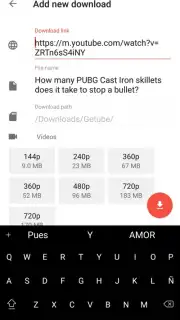
Granular Quality and Format Selection: After initiating the download, a detailed menu expands, presenting you with a comprehensive range of resolution and format options. You see specific choices from lower sizes for saving space to full HD and beyond for maximum clarity. This allows you to make a conscious trade-off between visual fidelity and storage consumption on your smartphone.
-
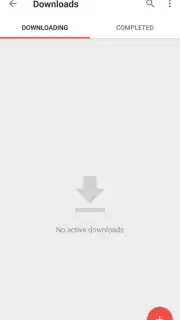
Direct File Management and Naming: Before the download finalizes, you are prompted to assign a custom filename to the video. This critical step lets you organize your library effectively from the start. Once completed, videos are stored locally in a dedicated downloads folder within the app and are accessible through your device's standard file manager for use in other applications.
-
Uninterrupted, Ad-Free Experience with Turbo: The app provides a clean, focused user experience. Optional Turbo mode enhances this further, streamlining operations and ensuring the process from selection to saved file is smooth and without interruptions.
Your New Standard for Media Access
This tool redefines convenience for students, travelers, professionals, and anyone who values uninterrupted access. You download the video once while connected to the internet, and from that point forward, it is available anywhere—on a plane, in a subway, or in a region with poor connectivity. The video file resides physically on your device, enabling playback through the app's built-in player without data usage, buffering, or streaming delays.
Stop watching the buffering symbol and start building a permanent, portable video collection. Take direct control over your favorite content today.
Download Getube now and turn every YouTube video into a permanent part of your offline library!
Internet required for download. IAP available.
Information
| Version | 6.0.1 |
| Developer | Robert Londo |
| Requirements | Android Android + 4.0, 4.0.1, 4.0.2+ |
| Updated | 17.03.2026 |
| Size | 3.21 MB |
| Package | tz.co.wadau.getube |
| Signature | cb3363348414b0583c830294c272e10f |


