

Grasshopper Controller screenshots (4)
Description Grasshopper Controller
Turn Your Phone Into a Design Powerhouse
Imagine holding your entire architectural or parametric design project in the palm of your hand, manipulating complex geometry with a simple tilt or swipe. That’s the transformative experience waiting for you with Grasshopper Controller. This innovative Android app solves a common creative bottleneck: the disconnect between digital modeling environments and intuitive, physical interaction. Instead of being confined to mouse clicks and keyboard shortcuts, you can now directly channel the sensor data from your mobile device into Grasshopper, making your design process fluid, interactive, and genuinely immersive.
A Wireless Bridge to Creative Freedom
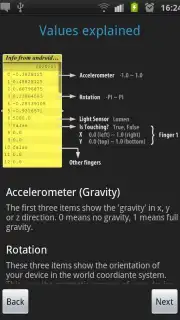
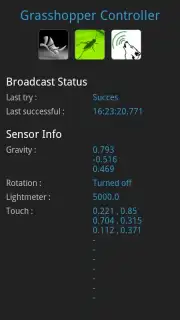
Grasshopper Controller establishes a seamless, wireless bridge between your Android device and the Grasshopper environment on your PC. It cleverly uses your device’s built-in sensors—like the accelerometer, gyroscope, and touchscreen—transmitting that rich data over Wi-Fi to influence your models in real-time. Picture adjusting a facade’s curvature by rotating your phone, exploring lighting scenarios by moving your device through space, or scrubbing through parameters with a finger slide. This isn’t just remote control; it’s about giving your designs a tangible, kinetic quality that makes exploration faster and more intuitive.
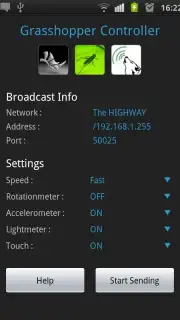
The magic happens through the gHowl plugin, which receives the data stream in Grasshopper and applies it to your definitions. Setting up is straightforward, guided by a built-in Help section that walks you through connecting to Grasshopper and even provides a sample file to jumpstart your experimentation. While optimal performance relies on having Rhino, Grasshopper, and the gHowl plugin installed on your computer, the payoff is a robust, ad-free tool that turns your phone or tablet into a dynamic control surface. The app manages Wi-Fi settings to maintain a stable connection, ensuring your creative flow is never interrupted by lag or dropouts.
- Wireless Sensor Integration: Tilt, rotate, and tap to control parameters.
- Real-Time Design Manipulation: See changes in Grasshopper instantly.
- Guided Setup & Support: Built-in help and a starter file for quick launch.
- Stable, Ad-Free Experience: Focused environment for uninterrupted creativity.
Why This App Changes Your Design Workflow
For architects, designers, and digital artists, this app moves you from passive screen interaction to active, embodied design. The ability to experiment with gravity, rotation, and touch adds a layer of rapid prototyping that was previously cumbersome. It encourages playful exploration, helping you discover forms and relationships you might not have found with a mouse alone. While compatibility is focused on specific versions like Rhino 4.0 SR8 and Grasshopper 0.8.0066, the potential within that ecosystem is vast. The developer actively encourages user feedback, signaling a tool that evolves with its community, aiming to smooth out any device-specific quiries and expand its capabilities.
We suggest trying Grasshopper Controller to unlock a more intuitive and engaging way to shape your digital creations. Consider downloading it now to experience how blending physical movement with parametric design can revitalize your projects.
Download the Grasshopper Controller mobile app now to begin.
Disclaimer: This application requires a stable internet connection (Wi-Fi) for full functionality to communicate with Grasshopper on a desktop computer. It requires specific third-party software (Rhino, Grasshopper, and the gHowl plugin) to be installed on a PC to operate. The app may request permissions related to Wi-Fi connection management to ensure stable data transmission. It is intended for professional or educational use by appropriate age groups familiar with the required desktop software. Data usage depends on the duration and stability of your Wi-Fi session. Always ensure your systems are compatible with the stated software versions.
Information
| Version | 1.1 |
| Developer | Sam Bernaerdt |
| Requirements | Android Android + 8+ |
| Updated | 17.03.2026 |
| Size | 439.95 KB |
| Package | be.bernaerdt.grasshoppercontroller |
| Signature | 273ea698455fb126a8a0fd2b5a61bd07 |


