

IO Launcher (Lollipop + iOS 8) screenshots (6)
Description IO Launcher (Lollipop + iOS 8)
A Different Kind of Home Screen
For users curious about the iOS experience but committed to the flexibility of Android, a specific challenge arises: how to blend these two philosophies without compromising on functionality. IO Launcher (Lollipop + iOS 8) approaches this not as a simple skin, but as a systematic re-engineering of the home screen environment. It replicates the structural logic and visual cadence of Apple's iOS 8, providing a methodical and cohesive alternative to the standard Android launcher interface. This is less about imitation and more about importing a distinct organizational paradigm onto your device.
Core Functionality and Customization Depth
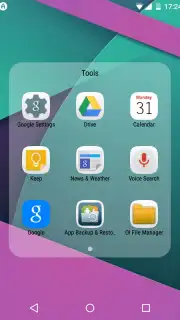
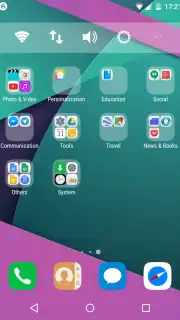
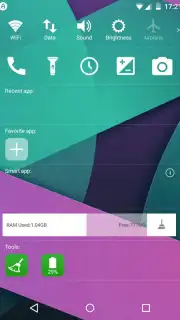
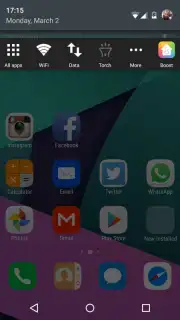
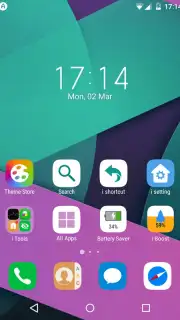
Upon initial launch, the application performs an automatic audit of all installed programs. It doesn't merely list them; it categorizes each icon into thematic folders, immediately imposing a structured order that reduces visual clutter. The primary workspace populates with these sorted applications, ensuring all accessible software is present on the desktop layer, eliminating the need to dive into a separate app drawer. This foundational organization is augmented by widget functionality that mirrors iOS staples, including system status modules for monitoring storage capacity and tools for clearing temporary cache files.
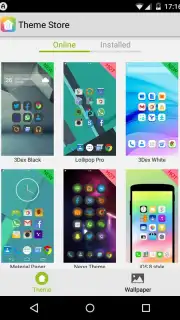
The launcher's framework is designed for extensive personalization. Beyond the default iOS 8 aesthetic, an integrated theme store allows users to download and apply visual profiles that mimic the interfaces of devices like the Samsung Galaxy S or Sony Xperia series. The true depth of customization, however, lies in the granular control over individual components. Users can independently modify icon sets, apply custom background wallpapers, select from various animation effects for screen transitions, and change the layout style of the application menu itself. This enables a highly tailored environment that can range from a faithful replica to a unique hybrid design.
Key Feature Breakdown
- Automated App Organization: Scans and sorts all installed applications into logically grouped folders directly on the home screen for immediate, structured access.
- iOS-Style Widget Integration: Implements functional widgets reminiscent of iOS, such as storage monitors and system cleanup tools, directly onto the desktop.
- Multi-Platform Theme Engine: Provides access to a library of themes extending beyond iOS to emulate other popular smartphone interfaces and allows deep visual customization of icons, backgrounds, and animations.
We suggest trying IO Launcher if you are seeking a fundamentally different, more regimented organizational system for your Android device, or if you wish to experiment with the visual language of other platforms without leaving the Android ecosystem. Consider downloading it to experience this structured approach to interface management.
Heads up: you'll need Wi-Fi for downloading additional themes from the online gallery. Some of the more advanced visual customizations and theme packs are premium extras.
Information
| Version | 2.8 |
| Developer | Hi App Team |
| Updated | 17.03.2026 |
| Size | 2.36 MB |
| Package | com.i.launcher |
| Signature | 6f962061ddc2e2502dadab5a59042d5e |


