


Juggluco screenshots (12)
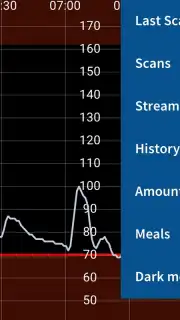
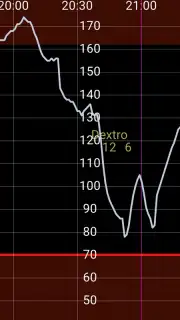
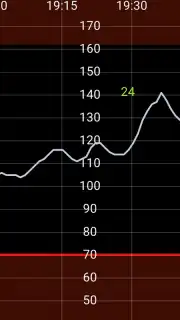
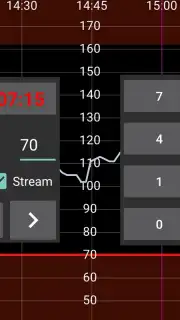
Description Juggluco
A Practical Review of Juggluco: Beyond the Standard Libre Experience
For users of the Abbott Freestyle Libre 2 continuous glucose monitoring system, the official companion apps provide a foundational service: alarms for high and low glucose events. However, the core value of real-time, minute-by-minute data streaming via Bluetooth often remains locked away, accessible only for alarm triggers, not for proactive insight. Juggluco, developed by Jaap Korthals Altes, directly addresses this gap. It is a utility application designed to intercept and display the full Bluetooth data stream from your sensor, transforming your smartphone into a comprehensive, real-time glucose monitoring dashboard. This review examines its functionality, setup process, and extended ecosystem integration, providing a clear analysis for those seeking greater data transparency from their CGM.
The primary function of Juggluco is to establish and maintain a direct Bluetooth connection with a Freestyle Libre 2 sensor. It is crucial to understand that a sensor can only maintain one active Bluetooth connection at a time. Therefore, successful setup with Juggluco requires deactivating all competing connections. This involves force-closing the official LibreLink app and ensuring any dedicated Freestyle reader device is powered off or out of range. Once this is done, with Juggluco open, you perform several NFC scans of the sensor. If configured correctly, Juggluco will typically establish its own proprietary Bluetooth link within 20 minutes, beginning a continuous stream of glucose values every minute directly to your phone. Notably, the application also supports newer Freestyle Libre 3 sensors, though its core operational logic is built around the Libre 2 platform; specific guidance for Libre 3 integration is available on the developer's website.
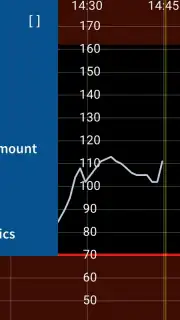
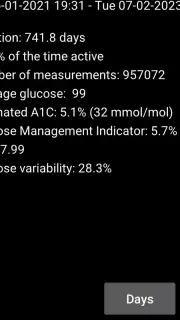
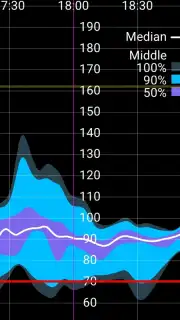
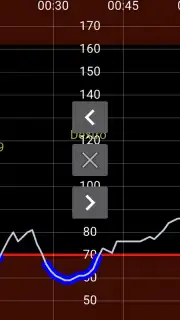
Once connected, Juggluco presents data through a unified, detailed interface. It seamlessly combines two data sources: the live Bluetooth stream and the historical data retrieved via an NFC scan. This results in a comprehensive graph that displays not only the current real-time glucose level but also the full eight-hour memory log from the sensor. Beyond passive monitoring, the app allows for manual logging of insulin doses, carbohydrate intake, and physical activity, which can be plotted directly onto the glucose chart for contextual analysis. From the continuous data stream, Juggluco generates valuable summary statistics, including Time in Range percentages and an estimated A1c, with the potential for aggregate trend graphs as more data is collected. A significant advantage is its flexibility in data distribution. Juggluco can relay glucose readings to smartwatches through multiple methods: via Android notifications synced to compatible watches, through dedicated watch apps like Kerfstok for Garmin, via xDrip watch faces, or by broadcasting data to other Android apps that then forward it to wearables. A dedicated Wear OS version also exists for direct watch integration.
- Real-Time Bluetooth Data Display: Transforms the Libre 2's minute-by-minute stream into a visible, constant glucose readout without requiring scans.
- Unified Historical and Live Graphing: Merges NFC scan history with live Bluetooth data into a single, detailed chart for complete trend analysis.
- Multi-Path Smartwatch Integration: Sends glucose data to wearables via notifications, companion apps, or broadcast to third-party applications.
The utility Juggluco provides in unlocking the full potential of your CGM data is substantial. For technically-inclined users seeking to move beyond basic alerts to a truly proactive health management tool, it offers a level of access and customization the official ecosystem does not. For a limited time, new users can access this enhanced monitoring capability directly. This exclusive setup transforms your existing hardware into a more powerful health dashboard. Download the mobile app now to begin the configuration process and take full control of your glucose data today.
Note: This application requires an active internet connection for initial setup and certain functions, and it is designed to work with specific, commercially available glucose sensors. Operation depends on a compatible smartphone with NFC and Bluetooth capabilities. Always consult with your healthcare professional regarding diabetes management.
Information
| Version | 10.6.4-phone-li3-si-x-nog |
| Developer | Jaap Korthals Altes |
| Requirements | Android Android + 5.0+ |
| Updated | 17.03.2026 |
| Size | 49.07 MB |
| Package | tk.glucodata |
| Signature | 42d2de8445494d7f48ce32bafaf32c0e |
| Architecture | armeabi-v7a, x86, arm64-v8a, x86_64 |


