


Julian Date Conv Calendar screenshots (5)
Description Julian Date Conv Calendar
What if you could instantly bridge the gap between modern and legacy date systems on your phone?
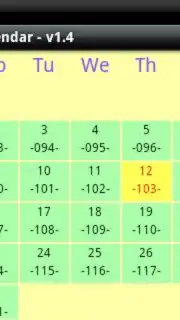
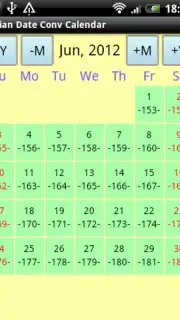
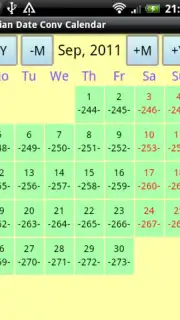
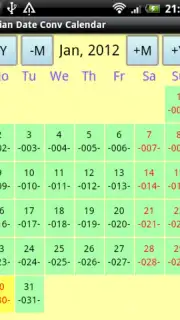
For professionals in fields like mainframe programming, historical research, or advanced project planning, working with Julian dates is a daily necessity, yet converting them to the standard Gregorian calendar can be a tedious interruption. The Julian Date Conv Calendar app addresses this core challenge directly, functioning not as a simple gadget but as a dedicated, authoritative conversion tool. Its primary interface presents a clear month-by-month view where every date is displayed twice: once in the familiar Gregorian format and once in its corresponding Julian date format, side-by-side. This parallel display eliminates the need for manual lookup tables or mental calculation, transforming a complex task into a simple visual reference. The utility is immediately apparent for anyone managing schedules, analyzing historical data logs, or writing code that interacts with older systems where Julian dates are the standard.
Beyond the fundamental conversion, the application offers a layer of detailed temporal data crucial for precise organization. It can display the international week number alongside each date, a feature vital for financial quarters, manufacturing cycles, and ISO-compliant reporting. The display is not static; it is highly adaptable through comprehensive settings. Users can configure exactly which elements appear on the main calendar screen—choosing to show or hide Gregorian dates, Julian days, week numbers, or any combination thereof. This allows the calendar to be tailored from a full-information dashboard for a systems analyst to a streamlined Julian-day tracker for a specialist. Visual customization extends to adjustable font sizes for different display modes, ensuring optimal readability across various device screens and user preferences, with Julian days distinctly marked by hyphens (e.g., "-123-") and week numbers enclosed in parentheses for instant, at-a-glance differentiation.
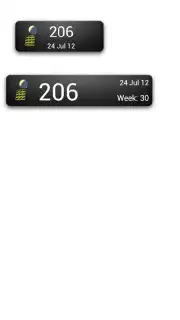
The functionality integrates deeply with the Android environment to streamline workflow. An optional long-press gesture on any date can be enabled to launch the device's native calendar or diary app, creating a seamless bridge between specialized date conversion and standard scheduling. For constant access without opening the app, optional home screen widgets provide a persistent view of the current Julian day, though platform restrictions require the app to be installed on the device's internal storage, not an SD card, for widgets to operate. The app also supports an optional landscape orientation mode for a wider, more detailed view, and consistently displays the ongoing week-of-the-year count. It operates without any advertising interruptions, offering a focused and efficient user experience dedicated purely to utility and accuracy in date management.
- Dual-Calendar Month View: Presents Gregorian and Julian dates side-by-side for instant, error-free visual conversion and comparison.
- Configurable Data Overlays: Toggle the display of week numbers, Julian days, and Gregorian dates to create a personalized information layout.
- Interactive Device Integration: Enable long-press on dates to launch your native calendar app for seamless scheduling from any converted date.
- Persistent Home Screen Widgets: Glance at the current Julian day directly from your home screen for constant, one-tap reference.
- Adaptive Visual Settings: Customize font sizes for different views and enable landscape mode to optimize readability on any screen.
Download the Julian Date Conv Calendar mobile app now—exclusive access to this streamlined professional tool is available for a limited time to new users. Transform your device into a dedicated date conversion terminal and eliminate scheduling inaccuracies today.
Disclaimer: This application requires an internet connection for initial functionality verification and may contain optional in-app purchases for advanced future features. It is intended for professional and general adult use. Data usage is minimal and related to basic application services. Please ensure your device meets the current Android version requirements for all features, such as the long-press calendar integration. The widget feature requires installation on internal device storage.
Information
| Version | 1.18 |
| Developer | whynotnowtoday |
| Requirements | Android Android + 11+ |
| Updated | 17.03.2026 |
| Size | 2.65 MB |
| Package | whynotnowtoday.juldate |
| Signature | b85efbba153e00d2361c1c7b11a6e732,84c421d43e0d673fbbf7101b80ff330c |
| Architecture | universal |


