

Media Player Classic Remote screenshots (1)
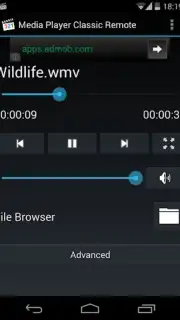
Description Media Player Classic Remote
Ever found yourself comfortably settled on the couch, a movie loaded on your PC, only to realize the keyboard is just out of reach? Fumble with playback, adjust the volume, or search for a new file without ever leaving your seat.
Media Player Classic Remote transforms your Android phone into a powerful, wireless command center for the legendary Media Player Classic – Home Cinema (MPC-HC) on your Windows PC. This app establishes a seamless connection over your local network, putting complete control of your media library in the palm of your hand. Navigate your video folders, manage complex playlists, and command playback with precision—all from the comfort of your sofa or bed. It’s designed to recognize and interface directly with MPC-HC’s robust feature set, turning your viewing experience from a desktop chore into a truly relaxed, cinematic event.
Core Functionality & Control
The app mirrors the desktop application’s functionality with an interface optimized for touch. You get direct access to the player’s core controls and advanced features without needing to mimic a full mouse and keyboard setup on your phone.
- Complete Playback Control: Play, pause, stop, skip chapters, and adjust volume with dedicated, responsive buttons.
- Direct File & Playlist Navigation: Browse your PC’s media folders, open files directly, and manage running playlists from your device.
- Advanced Command Access: Send specific commands like jumping to a percentage of the file, toggling fullscreen, or adjusting subtitle sync.
Key Advantages for the User
Experience a new level of convenience and integration that makes traditional control methods feel outdated.
- Streamlined, Intuitive Interface: A clean layout designed for quick glances and easy use in a dark room, putting essential controls front and center.
- Stable, Low-Latency Connection: Engineered for reliable communication with MPC-HC, ensuring your commands are registered instantly without frustrating lag.
- Focus on Core Utility: It does one job exceptionally well—controlling MPC-HC—without unnecessary bloat or confusing extra features.
We suggest trying Media Player Classic Remote to unlock the full potential of your home media setup. Consider downloading it today and turn your phone into the ultimate remote.
Heads up: you'll need wifi for most features. Some cool stuff is extra.
Information
| Version | 1.2 |
| Developer | Skovvart |
| Requirements | Android Android + 4.0, 4.0.1, 4.0.2+ |
| Updated | 17.03.2026 |
| Size | 773.68 KB |
| Package | com.skovvart.mpcremote |
| Signature | 8a111d97328707d16b3565188f999816 |


