


Microsoft Power BI screenshots (5)

Description Microsoft Power BI
From Data to Decision in Your Pocket
Imagine you're in a crucial meeting, and a question arises about last quarter's regional sales performance. Instead of scrambling for a report or waiting to get back to your desk, you pull out your phone. Within seconds, you're interacting with a live, visual dashboard, drilling down into the data with a touch, and presenting a clear, actionable answer. This is the reality of mobile business intelligence. The Microsoft Power BI app transforms your Android device into a direct window into your organization's most critical metrics, ensuring you are never disconnected from the insights that drive strategy.
Core Analytical Mechanics and Tools
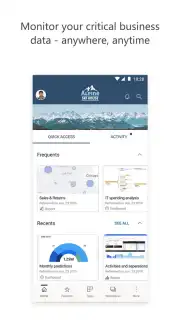
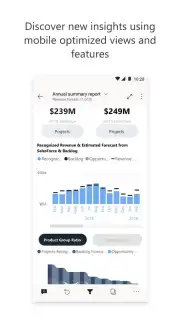
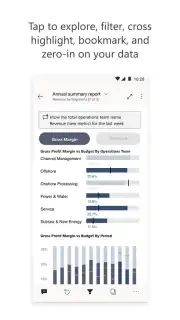
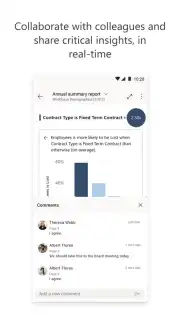
This application serves as the mobile command center for Power BI reports and dashboards published from the desktop service. The core mechanic is secure, on-demand access to interactive data visualizations. You can view and interact with reports designed by your team, applying filters, highlighting data points, and drilling down through hierarchies to explore the underlying figures. A key feature is the ability to receive and act on data-driven alerts directly on your device; you can configure notifications for when a KPI crosses a threshold, allowing for immediate response. The app also supports offline viewing for pre-pinned reports, enabling you to review key information without a network connection. For collaborative analysis, you can quickly share snapshots of insights or annotated screenshots with colleagues directly from within the app, streamlining communication.
Key Operational Advantages
The primary strength lies in its seamless integration with the full Power BI ecosystem, providing a consistent experience from desktop to mobile. The user interface is optimized for touch, making complex data exploration intuitive with gestures like pinch-to-zoom on charts and swipe navigation between report pages. Visuals are rendered crisply, maintaining the formatting and branding of the original reports. Performance is tuned for mobile, with efficient data caching to ensure dashboards load promptly, even with complex data models. Security is enterprise-grade, supporting conditional access and multi-factor authentication to protect sensitive business data on the go.
- Interactive Dashboards: Touch and explore live, updating reports with filters and drill-through capabilities.
- Proactive Mobile Alerts: Get notified directly on your device when your data changes or thresholds are met.
- Offline Access Mode: Review critical, pre-pinned reports and dashboards without an internet connection.
- Annotate and Share Insights: Mark up snapshots and instantly share findings with your team for faster collaboration.
- Enterprise-Grade Security: Access your data confidently with robust, built-in security and compliance features.
Don't wait for your next desk session to understand your business. Get the insight you need, the moment you need it.
Download Microsoft Power BI now and put your data in motion.
Internet required. IAP available.
Information
| Version | 2.2.260811.21320514 |
| Developer | Microsoft Corporation |
| Requirements | Android Android 11+ |
| Updated | 02.09.2026 |
| Size | 94.68 MB |
| Package | com.microsoft.powerbim |
| Signature | 83:BF:5E:91:01:20:5C:12:F9:7E:81:DF:4E:53:B6:4C:F6:B0:AD:B2 |
| Architecture | x86, x86-64, armeabi-v7a, arm64-v8a |


