


Mixtube screenshots (6)




Description Mixtube
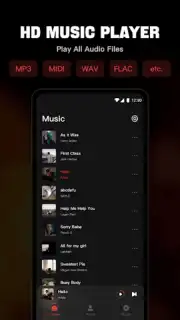
Looking for a comprehensive offline music player that handles your entire local library without compromise? Mixtube is a dedicated audio player application designed for users who store music files directly on their device, offering extensive format support and granular control over playback and organization.
Core Functionality and Audio Performance
Mixtube operates as a full-featured local media player. Its primary function is to scan and catalog audio files stored on your device's internal memory or SD card, creating an instant personal music library. The app distinguishes itself with broad codec compatibility, supporting not only standard MP3 files but also high-fidelity formats like FLAC and APE, as well as MIDI, WAV, and AAC. Playback is managed through a central audio engine that maintains stability across different file types. A multi-band equalizer with pre-set configurations is built into the app, allowing for precise adjustment of output to match headphone or speaker profiles. Playback continues in the background when the app is minimized or the screen is locked, and audio control is accessible from both the notification shade and the device's lock screen for operational convenience.
Library Management and User Interface
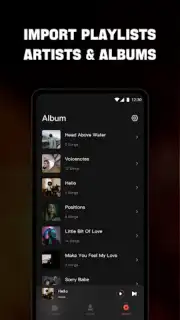
The application provides several methods for navigating a music collection. The main library can be sorted and filtered by standard metadata tags: song title, artist, album, and genre. Additionally, Mixtube offers a folder-based view, enabling direct navigation of your device's file directory structure, which is crucial for users who organize music manually. Users can create and edit custom playlists within the app, and any track can be flagged as a favorite for quick access. For home screen accessibility, the app supports customizable widgets of various sizes, providing play/pause and skip controls without needing to open the application fully.
Subscription Model and Ad Experience
The app utilizes a freemium model. The base version is fully functional for playback and library management but includes advertising displays. Mixtube offers a premium subscription tier, branded as Turbo, which removes all advertisement interruptions. Subscription plans are structured on a recurring monthly or annual basis, with a one-time lifetime purchase option also available. Subscription management, including cancellation, is handled through your account settings within the app store ecosystem. The core feature set between free and premium versions remains identical, with the subscription solely affecting the presence of ads.
- Extensive format support for MP3, FLAC, AAC, WAV, MIDI, and APE files.
- Background playback and controls accessible from the lock screen and notifications.
- Customizable equalizer with multiple presets for audio fine-tuning.
- Flexible library views by metadata, folders, and user-created playlists.
- Home screen widgets for instant player access and transport controls.
Get your bonus of an ad-free, high-fidelity listening experience by upgrading your local music playback today. Download Mixtube now to take full command of your personal audio collection.
An internet connection may be required for initial app download and subscription management. The app offers in-app purchases for a premium subscription to remove advertisements. It is designed to play locally stored audio files.
Information
| Version | 4.7.1 |
| Developer | Mixtube Music player |
| Requirements | Android Android + 7.0+ |
| Updated | 17.03.2026 |
| Size | 41.05 MB |
| Package | com.toto.jcyj.mvmix |
| Signature | 0ee66d019a6295f9d0b570941753d61f |
| Architecture | armeabi-v7a, arm64-v8a |





