

MusicFX screenshots (2)
Description MusicFX
Struggling with Flat or Uninspiring Sound on Your Android Device?
Many Android users encounter a lack of depth and clarity in their device's audio output, whether using built-in speakers, wired headphones, or Bluetooth accessories. The standard sound processing can often leave music feeling compressed and lacking in dynamic range. MusicFX is a dedicated audio enhancement application designed to directly address this by injecting professional-grade sound effects and precise control into your Android's audio pipeline. It operates at the system level to enrich audio across compatible media players, transforming the listening experience for music, podcasts, and other media without requiring you to switch your default apps.
Core Functionality and Technical Features
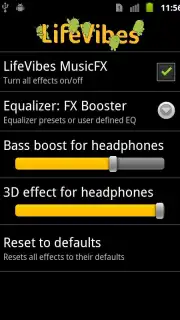
MusicFX integrates seamlessly into the Android sound effects menu, becoming a system-wide audio processor. Upon installation, it adds a dedicated control panel accessible from within your device's settings and supported music applications. The primary function is to apply real-time audio effects that are typically absent from standard mobile audio hardware. A key technological feature is the 3D virtualization effect for headphones, which uses stereo widening and reverb algorithms to create an immersive soundstage, making the audio feel less confined inside your head. This is complemented by a dedicated bass boost circuit that amplifies low-frequency response without distorting the mids and highs.
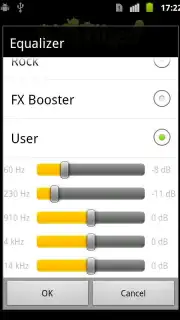
For fine-tuning, the app provides a five-band graphic equalizer with adjustable center frequencies and gain levels, allowing for surgical correction of your audio output. It ships with several genre-specific presets—including Classical, Dance, Rock, and Pop—that serve as starting points for optimization. The system is designed to work with the native Android music player and other media applications that support the standard Android audio effects API. For Bluetooth audio enhancements to function, the app requires permission to access Bluetooth settings to identify and process the connected device's audio stream. The application uses an internet connection primarily to fetch updated help documentation and developer notices from its servers.
- System-wide audio enhancement processor
- 3D headphone virtualization with reverb
- Five-band EQ with custom presets
We suggest trying MusicFX if you seek direct control over your Android device's audio output and wish to add spatial effects and equalization that the manufacturer may not provide.
Technical Disclaimer: This application requires an internet connection for fetching updated help pages. It requires access to Bluetooth settings to enable audio processing for Bluetooth headphones. The app functions as a system audio effects service and its availability depends on your device's Android version and hardware compatibility. It is intended for general audiences but involves technical audio settings. Data usage is minimal and related to documentation updates only. Please check your specific device compatibility before use.
Information
| Version | 1.6 |
| Developer | NXP Software B.V. |
| Updated | 17.03.2026 |
| Size | 486.51 KB |
| Package | com.lifevibes.musicfx |
| Signature | 3cf5b5bbedcf2d139826a972664fc270 |


