


mysms - SMS anywhere screenshots (5)



Description mysms - SMS anywhere
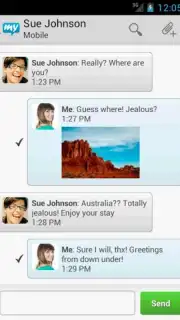
Imagine needing to send a text message, but your phone is charging in another room. The mysms - SMS anywhere application provides a functional solution to this common scenario by establishing a seamless bridge between your mobile phone and other internet-connected devices. This tool enables users to manage their standard SMS and MMS conversations directly from a computer or tablet interface.
Core Functionality and Setup Process
The application operates on a synchronization principle. It requires the mobile app to be installed on your primary smartphone, which acts as the hub for your message center. A corresponding desktop or tablet client—available for platforms like Windows via sources such as Uptodown—must also be installed on the secondary device. During the initial setup of this desktop client, you verify your identity by registering your mobile phone number. This creates a secure link, allowing the desktop application to mirror and manage the messages sent and received on your phone. The system functions by securely routing your texts through your phone, ensuring delivery originates from your actual mobile number.
Interface and User Experience
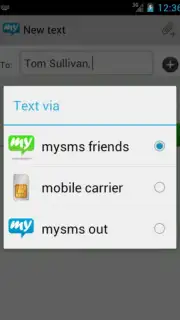
The mobile version of mysms provides a streamlined interface for account management and core settings. The design focuses on configuring the connection between devices rather than replacing your default messaging app for on-phone use. A notable operational feature is the optional "Turbo" mode, which is promoted to enhance message synchronization speed and reliability between your linked devices. The service model for the desktop client is supported without advertisements, contributing to an uninterrupted workflow when texting from a computer.
Key Features of mysms
- Synchronizes SMS and MMS across your phone, tablet, and computer.
- Requires companion app installation on each secondary device used.
- Free desktop clients are available for download from official sources.
- Optional Turbo mode for potentially faster message delivery sync.
- Ad-free experience within the desktop and tablet application interfaces.
Consider downloading mysms - SMS anywhere if you frequently need a physical keyboard for texting or manage messages from a centralized workstation. The setup is logical and provides a practical extension of your phone's core messaging capability.
Download the mobile app now to begin the setup process.
A standard internet connection is required for synchronization. The app may offer optional in-app purchases for enhanced features.
Information
| Version | 7.1.3 |
| Developer | Up to Eleven |
| Requirements | Android Android + 6.0+ |
| Updated | 17.03.2026 |
| Size | 8.01 MB |
| Package | com.mysms.android.sms |
| Signature | a1517cfbf2e3501bba85e4761dcf049b |
| Architecture | universal |


