


Niagara Launcher screenshots (4)


Description Niagara Launcher
A Minimalist Launcher That Solves Smartphone Clutter
The common smartphone interface often becomes a barrier to productivity, filled with visual noise, endless pages of apps, and distracting notifications. This design philosophy prioritizes showing everything at once, which can overwhelm users who simply want to access their core tools quickly. The Niagara Launcher approaches this problem from a different angle, treating the home screen not as a display case, but as a focused control panel. It systematically reduces interaction time by predicting user intent and surfacing only the most immediately relevant information.
Core Mechanics and Analytical Overview
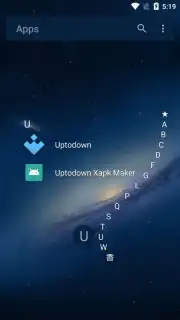
Upon initial setup, the launcher presents a critical design choice: selecting between one and eight primary application icons for permanent placement on the home screen. This is not merely aesthetic; it forces a conscious prioritization of utility, establishing a static anchor for daily digital routines. Access to the full application library is handled through a persistent alphabetical scroll bar on the right edge of the screen. This mechanic replaces the traditional multi-page grid hunt with a single, rapid vertical gesture, effectively turning app retrieval into a search operation rather than a memory test of icon location.
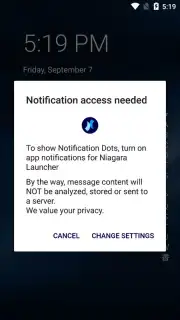
A defining functional layer is the integrated notification preview system. For supported messaging applications like WhatsApp, Telegram, and LINE, incoming message content is displayed directly beneath the app's icon on the home screen. This eliminates the need to open the application for context, allowing users to triage conversations at a glance. The launcher's architecture is notably lean, consuming minimal system resources and storage space. It deliberately omits the sprawling feature sets common in other personalization tools, focusing its development on a streamlined, gesture-driven interface that avoids performance degradation over time.
The absence of advertising within the core interface is a foundational principle. Optional advanced features, often grouped under performance or customization enhancements, are typically unlocked via a separate module, preserving the base experience as clean and uninterrupted.
Detailed Feature Breakdown
- Focused App Favorites: Pin between 1 to 8 essential apps for instant, one-tap access directly from your primary home screen, reducing daily interaction steps.
- Alphabetical Glide Navigation: Utilize a right-side scroll bar to fluidly glide through your entire app list alphabetically, making any app findable in under two seconds.
- Inline Notification Previews: Read messages from apps like WhatsApp and Telegram directly on the home screen, with preview text shown cleanly below the app icon.
Download the Niagara Launcher mobile app now to experience a clutter-free interface—this limited introductory setup offers exclusive optimization for new users today only.
Internet required. IAP available.
Information
| Version | 1.16.22 |
| Developer | Peter Huber |
| Requirements | Android Android 8.0+ |
| Updated | 02.09.2026 |
| Size | 13.64 MB |
| Package | bitpit.launcher |
| Signature | 88:83:81:26:53:DB:1B:00:1E:71:1F:9A:F9:20:BD:BC:59:10:89:9F |
| Architecture | x86, x86-64, armeabi-v7a, arm64-v8a |





