


OiTube screenshots (5)


Description OiTube
A Quiet Revolution in Mobile Video Playback
There is a common, daily frustration for anyone who uses YouTube as a source for music, lectures, or long-form podcasts on their mobile device. You lock your screen to save battery or switch to check a message, and the audio abruptly cuts off, forcing you back into the official app with its persistent video player and ads. This interruption breaks immersion and limits utility. OiTube enters this space not as another feature-bloated client, but as a focused tool engineered to solve this specific, pervasive problem. It is a streamlined alternative YouTube client that prioritizes continuous, unobstructed audio-visual consumption above all else, redefining how the platform can be used on the go.
Core Mechanics and Functional Analysis
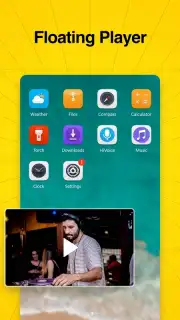
OiTube’s primary value proposition is its mastery of background and offline-screen playback, a technical workaround that the official YouTube application reserves for its premium subscribers. The implementation here is notably clean and user-centric. When a video is playing, you can minimize the OiTube app, and it will seamlessly transition into a compact, draggable floating window. This picture-in-picture mode remains visible over any other application, allowing for true multitasking. For pure audio listening, a tap on the dedicated audio-only button transforms the interface into a minimalist media player; from there, you can safely turn off your device’s display while the audio continues uninterrupted, effectively converting YouTube into a robust music or podcast streaming service without any subscription fee.
A secondary, equally critical function is its integrated advertisement management system. Upon installation, OiTube operates with a default setting that intercepts and blocks pre-roll, mid-roll, and banner video advertisements within the YouTube environment. This is not presented as a hack, but as a core feature of the "Turbo" experience the app promotes. The toggle for this ad-blocking is readily accessible in the settings, providing users with control, though the uninterrupted viewing experience it enables by default is a significant departure from the standard, ad-saturated browsing. It is crucial to understand the app’s scope: unlike some other third-party clients, OiTube does not include a native video downloader for offline storage. Its design philosophy is squarely centered on enhancing the real-time streaming experience through playback freedom and content purity.
- Persistent Background Audio Playback: Listen to any YouTube video with your screen off, enabling music, podcasts, or lectures without draining battery life on the video stream.
- Floating Mini-Player Window: Minimize videos into a movable, always-on-top window for seamless multitasking across other smartphone applications.
- System-Wide Ad Blocking: The integrated "Turbo" mode actively blocks video and display ads by default, creating an uninterrupted viewing session.
- Dedicated Audio-Only Mode: Switch to a streamlined audio interface with a single tap, stripping away the video component for purely auditory content consumption.
- User-Controlled Ad Preferences: Easily enable or disable the advertisement blocking functionality at any time through the app's straightforward settings menu.
Do not tolerate interrupted playback and intrusive ads for a moment longer. Transform your YouTube experience into a seamless, utility-focused media hub immediately. Download OiTube now and reclaim control over your mobile viewing.
Disclaimer: This application requires an active internet connection to stream content from YouTube. It may involve in-app purchases or premium features. Use of ad-blocking features should comply with the terms of service of your platform. This app is intended for a general audience; parental guidance is advised for younger users. Data usage will apply based on streaming quality and duration. The developer is not affiliated with or endorsed by YouTube or Google.
Information
| Version | 5.5.40.106 |
| Developer | OiTube Team |
| Requirements | Android Android + 5.0+ |
| Updated | 17.03.2026 |
| Size | 26.88 MB |
| Package | com.skipads.oitube.official |
| Signature | 1a688ea96d524458894fd531cc11c37a |
| Architecture | armeabi-v7a, arm64-v8a |


