


PhotoRoom screenshots (11)







Description PhotoRoom
Looking for a professional-grade photo editor that handles complex tasks with AI simplicity? PhotoRoom is a mobile application designed to transform image editing for e-commerce professionals, content creators, designers, and casual users. It provides a suite of AI-powered tools for background removal, scene generation, precise cutouts, and professional effects, all accessible without requiring deep technical expertise.
Core AI Editing Capabilities
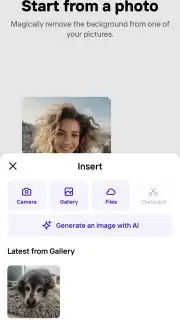
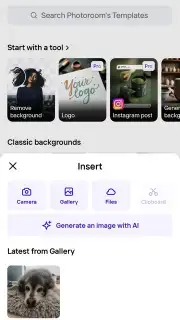
The application centers on a one-touch AI background remover. You select any image from your gallery where the background distracts from the primary subject. The processor analyzes the photo and isolates the main element, deleting everything around it within seconds. This automated cutout maintains high precision on edges and complex details like hair or fabric, eliminating the need for manual re-editing. For product listings or marketing materials, this function creates clean, isolated object shots ready for new compositions.
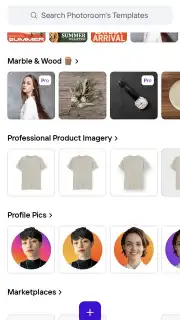
Beyond removal, the tool offers complete background replacement with AI-generated scenes or pre-designed templates. The integrated library contains hundreds of options ranging from minimalist white and color backdrops to complex environments like professional photo studios, urban landscapes, and custom decorative settings. You apply a new background with a single tap, converting a basic photograph into a polished, context-appropriate image suitable for social media posts or professional portfolios.
Advanced Creation and Stylization Tools
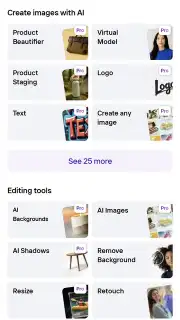
PhotoRoom includes a text-to-image AI generator for creating visuals from scratch. You input a descriptive text prompt of the scene, object, or concept you envision. The AI engine interprets this description and renders a high-resolution, realistic image. This mode is practical for generating product mockups, conceptual art, or original content assets without the need for source photography or stock images. Each generation aims to match the descriptive prompt with maximum visual fidelity and detail.
The app further provides advanced styling and effect suites. These include tools for adjusting lighting, applying filters, adding shadows for realism, and incorporating text overlays with customizable fonts. You can combine an AI-generated background with a cut-out subject, then apply these styling tools to achieve a cohesive, branded look. The workflow supports non-destructive editing, allowing for layer adjustments and effect modifications at any stage of the composition process.
- One-tap AI background removal
- AI-generated scene and template library
- Text-to-image creation from prompts
- Professional styling and effect tools
Download the PhotoRoom APK now to instantly access professional photo editing! Transform your product shots, create stunning social content, and generate unique images immediately—do not wait to upgrade your visual workflow!
Disclaimer: This application requires an internet connection for full AI processing functionality. It may offer in-app purchases for premium features, templates, or subscription plans. Data usage applies during image upload, processing, and download. Please check the product listing for specific age ratings and permissions regarding device storage and camera access.
Information
| Version | 2026.11.04 |
| Developer | Photoroom AI Photo Editor |
| Requirements | Android Android + 10+ |
| Updated | 17.03.2026 |
| Size | 177.77 MB |
| Package | com.photoroom.app |
| Signature | f5a353dcf1d89f52e7df29bb235aa042 |
| Architecture | armeabi-v7a, arm64-v8a |


