


Pixel Camera screenshots (5)

Description Pixel Camera
Your Phone's Camera Is Holding You Back. Here's How to Fix It.
You know that feeling. You see a perfect moment—a sunset, friends laughing, the city lights at night—and you pull out your phone. The photo you get is okay, but it's grainy, the colors are flat, or the shadows are just black voids. It never quite matches the memory. What if your phone could actually capture what your eyes see, even in near-total darkness? That's the promise unlocked by Pixel Camera, the official Google Camera app engineered to transform your Android device into a far more powerful imaging tool. Think of it as installing a professional-grade camera lens directly onto your phone, replacing the basic, often limited default camera application you currently use.
Beyond the Standard Shot: Features That See in the Dark
This isn't just about adding filters. Pixel Camera is built on computational photography that works tirelessly behind the scenes. The cornerstone is HDR+ technology, which takes multiple frames in an instant and combines them. This means you can point your phone at a bright window without turning the room into a silhouette, or capture vibrant details in a shaded park on a sunny day. The magic truly happens when the lights go down. Night Sight mode is a revelation, allowing you to take clear, detailed, and surprisingly bright photos in environments where you'd normally need a flash or give up entirely. It illuminates scenes naturally, preserving the ambiance instead of washing it out with a harsh light.
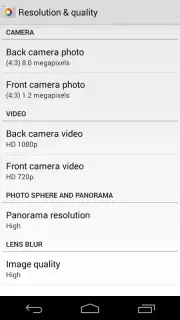
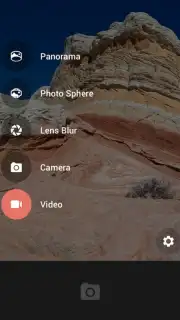
But the innovation doesn't stop at terrestrial nightscapes. For the dreamers and stargazers, the Astrophotography tool is a game-changer. By stabilizing the shot and using long exposure techniques, it can pull detail from the night sky, rendering sharp images of stars, constellations, and celestial events you thought were impossible to capture with a smartphone. When it comes to video, Pixel Camera elevates your recordings from simple clips to cinematic moments. You can record in high-resolution formats, apply cinematic blur and stabilization for a professional look, and even capture clear video in low light. Crucially, you maintain full control, being able to select your desired resolution and set file size limits to manage your device's storage intelligently.
Why This Camera App Becomes Your Essential Tool
- Master Low-Light Photography: Capture stunning clarity and color in dark restaurants, evening streets, or moonlit landscapes without using the harsh, unnatural flash.
- Unlock Astrophotography: Point your phone at the night sky and capture detailed shots of stars and the Milky Way, a feature typically reserved for high-end camera equipment.
- Professional-Grade Video Control: Record high-resolution video with cinematic stabilization and effects, with full manual control over resolution and file size output.
- Superior HDR+ Processing: Automatically balance extreme lights and darks in every shot, ensuring perfectly exposed photos in challenging backlight or high-contrast scenes.
- Optimized for Pixel, Powerful for All Android: While Pixel phones unlock exclusive features like full-resolution 50MP capture and advanced manual controls, the core suite of transformative tools enhances any compatible Android device.
- A Clean, Ad-Free Experience: The app operates without any advertisements, offering a pure and focused photography environment powered by Google's processing "Turbo" for speedy performance.
Download the Pixel Camera APK Now—Limited Access for Early Users
Stop settling for mediocre photos trapped inside your hardware. This is your chance to bypass limitations and install the software that redefines what your phone's camera can do. This exclusive access to Google's camera technology is a limited opportunity for Android users to upgrade their creative toolkit instantly. Transform your next photo walk, family gathering, or night out today.
Download the Pixel Camera mobile app now and see the difference for yourself.
Disclaimer: The Pixel Camera app requires a stable internet connection for initial download and updates. Certain advanced features may require specific hardware capabilities. The app is free to download and use; please check your device settings for data management options.
Information
| Version | 6.8.1 |
| Developer | Google Inc. |
| Requirements | Android Android 6.0+ |
| Updated | 15.09.2026 |
| Size | 20.65 MB |
| Package | com.google.android.GoogleCamera |
| Signature | 958ef8e3a0da342408e3e088b0476d4fb2ad20f1 |
| Architecture | armeabi-v7a |


