


Pixel Station screenshots (5)

Description Pixel Station
A Closer Look at Pixel Station: A Tool for Precision Digital Art
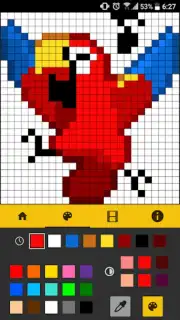
There is a specific satisfaction in building an image one square at a time, a process where every deliberate placement carries weight. Pixel Station, developed by STUDIO S, is engineered for this exact kind of methodical creation. It presents itself not as a simplified toy, but as a dedicated environment for constructing pixel art and animation, with an interface that logically arranges its tools to minimize friction between idea and execution. This focus on a clean, accessible workspace makes it a practical starting point for newcomers to the genre, while its deeper toolset offers the granular control that seasoned pixel artists require for detailed work.
Analytical Breakdown of Core Functionality
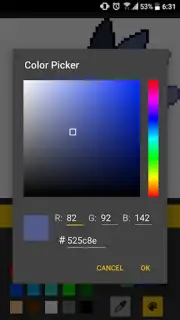
The application’s workflow is built around precision and iterative refinement. The foundational toolset includes a fully customizable brush, fill, and shape tools, but the efficiency gains are found in the supporting features. The integrated shading guide is a notable example, providing real-time visual feedback on light and shadow placement according to a set source, which teaches effective technique while in use. The color history palette and a sophisticated color picker work in tandem, allowing for quick recall and subtle adjustments to a project’s palette without breaking focus. For structural accuracy, the toggleable grid and multi-touch zoom functionality are essential, enabling artists to zoom in to the pixel level for meticulous editing and zoom out to assess the overall composition.
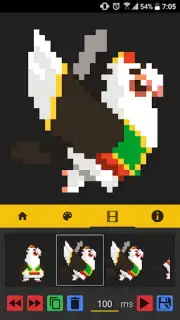
Where Pixel Station expands beyond static art is in its frame-by-frame animation suite. The onion skinning feature is implemented clearly, allowing you to see several previous and subsequent frames as translucent overlays. This is critical for creating smooth, consistent motion, as it provides a direct visual reference for positioning and proportion in each new frame. The process of building these animations is streamlined, and the app provides a direct export to GIF format, ensuring the final product is ready for sharing on social platforms or digital galleries without requiring secondary conversion software.
Key Features at a Glance
- Frame-by-frame animation with onion skinning
- Shading assistant and advanced color tools
- Toggleable precision grid and zoom
- Direct export to GIF and standard image formats
The absence of advertising interruptions, a noted feature of the standard version, is a significant design choice that preserves immersion. For users seeking to push the limits, optional performance enhancements are available to further streamline the experience. We suggest trying Pixel Station if your interest lies in digital pointillism or concise animation. It provides a focused, capable set of tools that respect the artist's process.
Download the Pixel Station mobile app now to start building your pixel-based creations.
Heads up: you'll need wifi for initial download and updates. Some advanced features and performance options are available as additional in-app purchases.
Information
| Version | 1.2.7 |
| Developer | STUDIO S |
| Requirements | Android Android + 4.0.3, 4.0.4+ |
| Updated | 17.03.2026 |
| Size | 2.1 MB |
| Package | com.studios.pixelstation |
| Signature | 0b647b527148d957490af8cafceb9082 |
| Architecture | universal |


