


Poster Maker screenshots (4)


Description Poster Maker
Transform Ideas into Professional Visuals with a Single Tool
Poster Maker provides a comprehensive mobile design suite engineered for creating high-impact promotional materials directly on Android devices. This application delivers professional-grade output for posters, flyers, invitations, and social media graphics without requiring advanced skills. It functions as a complete design workstation, offering precise control over every visual element to ensure your final product meets exact specifications for both print and digital formats.
Core Functionality for Custom Design Workflows
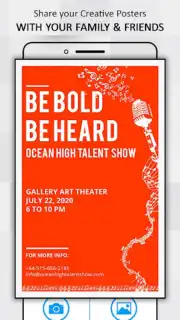
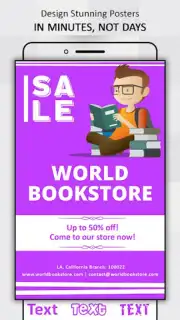
The application centers on a streamlined, layer-based editing interface. Users begin by selecting a canvas size or aspect ratio tailored for specific platforms, from Instagram stories to standard A4 print. The editor provides independent control over background layers, text boxes, and graphic elements, allowing for minute adjustments in positioning, scaling, and rotation. This modular approach supports complex compositions where personal photos can be blended with stock graphics and typography.
Systematic Asset Library and Editing Tools
Access a structured library containing over 120 categorized background templates, which are fully customizable in terms of color gradient and opacity. The typography engine includes a dedicated font manager with styles ranging from formal serifs to modern display fonts, each supporting individual kerning, shadow, and outline effects. A separate sticker repository offers vector-based icons and embellishments, all editable in color and size, to serve as design accents or informational graphics.
Output Optimization for Professional and Personal Use
The tool supports multi-format export, generating high-resolution image files suitable for professional printing or compressed versions optimized for web sharing. Its project templates are logically grouped by use-case: business promotion (flyers, brochures, email headers), event management (wedding invites, birthday announcements, graduation party posters), and social media branding (channel art, profile banners, post graphics). Each template maintains editable layers, enabling quick customization while preserving the original layout integrity.
- Customizable Background Library: Choose from over 120 template backgrounds and modify colors, gradients, and patterns to match your brand palette.
- Advanced Text Styling Engine: Apply distinct fonts with full control over spacing, shadows, and borders for creating hierarchical text layouts.
- Vector Sticker & Photo Integration: Layer resizable, recolorable sticker graphics with personal photos using blending and opacity adjustment tools.
We suggest trying Poster Maker for its methodical approach to on-device graphic design, which systematizes the creation of marketing materials and personal projects.
Download the mobile app now to access the full suite of design tools.
Heads up: you'll need wifi for initial asset downloads and updates. Some premium template packs and advanced export options are extra.
Information
| Version | 1.2 |
| Developer | photoshop mobile apps |
| Requirements | Android Android + 4.2, 4.2.2+ |
| Updated | 17.03.2026 |
| Size | 29.12 MB |
| Package | com.psma.postermaker |
| Signature | 63c2f4fca09617b2c4f667788210e45a |
| Architecture | armeabi, armeabi-v7a, mips, x86, arm64-v8a, mips64, x86_64 |


