


QR & Barcode Scanner screenshots (6)
Description QR & Barcode Scanner
Your Pocket-Sized Digital Bridge
Imagine you're at a store, curious about a product's reviews, but the box only has a barcode. Or you're at a café, and the WiFi password is hidden behind a complex QR code on the wall. In our fast-paced world, information is often locked behind these pixelated patterns. This isn't just a simple scanner; it's your direct key to unlocking that data instantly. Developed by 1MB Apps Studio, this Android tool transforms your device into a powerful portal, seamlessly bridging the gap between the physical and digital realms. It goes beyond basic reading, empowering you to create, organize, and manage codes for virtually any purpose, turning everyday hassles into effortless actions.
Engineered for Speed and Precision
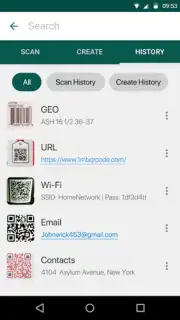
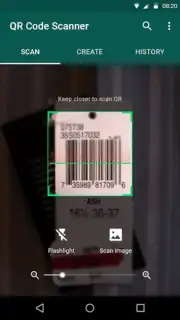
The core scanning engine is built for instantaneous performance. It features automatic multi-format recognition, instantly identifying QR codes, standard UPC/EAN barcodes, and other common symbologies the moment your camera aligns with them. You are not required to manually select a code type. The scanner activates a targeted illumination system—a software-optimized flashlight—to maintain accuracy in low-light conditions, such as dimly lit warehouses or evening events. For static images or screenshots, the application provides a dedicated gallery import mode, allowing you to select and decode pictures stored on your device. Every scan is logged in a detailed, searchable history with timestamp data, enabling you to retrieve any previously captured item without rescanning.
A Full-Spectrum Code Management Suite
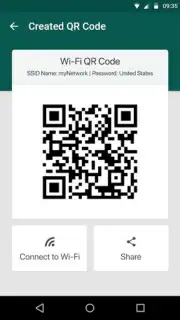
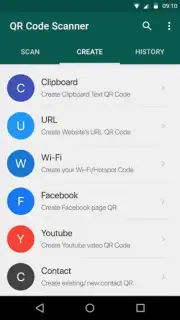
This application operates as a bidirectional toolset. Its creation module functions as a standalone generator for both QR codes and linear barcodes. You can produce custom codes containing specific data payloads: vCard contact details, precise geographic coordinates, plain text messages, structured URLs, and pre-configured WiFi network credentials (SSID and password). For logistics or inventory tasks, the batch scanning mode allows for the rapid sequential capture of multiple codes without closing the camera view. A critical utility is its dedicated parser for WiFi QR codes; scanning these codes automatically populates your device's network connection dialog with the encrypted credentials, facilitating one-tap connectivity to secured networks.
Organized Workflow and Practical Outputs
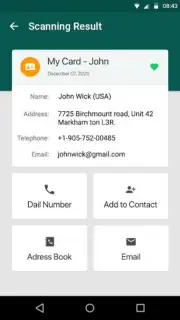
All scanned and generated codes are stored within a local, user-managed library. This library supports organizational tagging and a favorites system for quick filtering. Any item in your history can be shared externally through standard Android sharing protocols, sending either the extracted data (like a URL) or a generated image of the code itself. The interface is designed for minimal interaction: point, scan, and access results. There are no complex menus to navigate for primary functions. It is engineered for daily use cases including price comparison, accessing digital tickets and boarding passes, quickly saving contact information from business cards, and sharing your own WiFi network securely with guests.
- Instant Auto-Scan Recognition
- Create Custom QR & Barcodes
- Scan from Gallery & History
- Batch Mode & WiFi Connect
- Ad-Free, Turbo Performance
- Organize, Favorite, and Share
Don't let another code slow you down. Transform your smartphone into the most efficient data gateway you own. Get the complete scanning and creation solution immediately!
Download QR & Barcode Scanner now!
This application requires an internet connection for certain functions like product lookups. Some advanced features may be subject to in-app purchases. The developer, 1MB Apps Studio, is solely responsible for the app's content and functionality.
Information
| Version | 1.6.4 |
| Developer | 1MB Apps Studio |
| Requirements | Android Android + 5.0+ |
| Updated | 17.03.2026 |
| Size | 16.86 MB |
| Package | com.qrscanner.qrcodereader.barcodescanner.barcodereader |
| Signature | 5bb3354bac1a4908dfb9e6a6786e7501 |
| Architecture | armeabi-v7a, arm64-v8a |


