

RiMusic screenshots (11)







Description RiMusic
A Practical Review of the RiMusic Streaming Application
For users seeking an alternative method to access the extensive YouTube Music catalog without subscription fees or advertising interruptions, RiMusic presents a notable open-source option for Android. Developed by fast4x, this application functions as a dedicated client, facilitating direct streaming and download of audio content. Its current version, 0.6.76, offers a stable build focused on core music playback and library management within the Music & Audio category. The primary operational premise is to provide a clean, user-controlled interface for navigating a vast music repository, distinguishing itself through a high degree of visual and functional customization absent in many mainstream services.
Core Functionality and User Experience
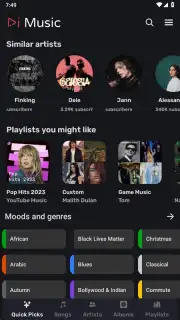
Upon initial launch, the application presents a layout that prioritizes immediate content discovery. The home tab dynamically populates with personalized suggestions, including artists with stylistic similarities to a user's frequent listens, trending tracks from favored genres, and curated playlists highlighting popular performers. This algorithmic curation operates locally based on playback history. For direct searches, a persistently accessible search field at the top of the interface allows for queries by song title, artist, or album, directly pulling from the source catalog. A significant operational feature is the absence of audio or banner advertisements during playback or browsing, which is a built-in characteristic of the application's design rather than a paid tier.
The playback experience is centered around a dedicated player screen. It supports standard controls for play, pause, skip, and seek, along with options for liking tracks and adding them to playlists. A key technical aspect is the stream initiation speed; the application typically begins playback with minimal buffering delay compared to some third-party streaming tools. For offline access, an integrated download manager allows users to save audio files directly to local device storage. Users can configure the maximum file size for these downloads, balancing quality against storage space. Downloaded content is organized within the app's library for offline playback without requiring an active internet connection.
Configuration and Advanced Settings
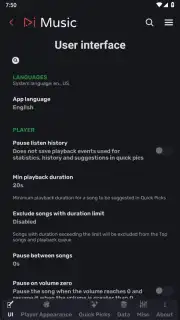
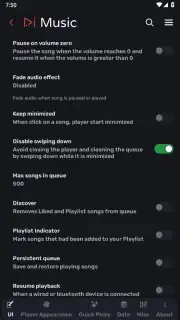
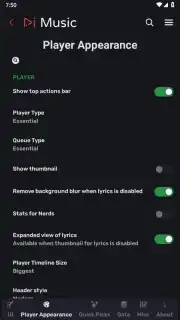
What significantly differentiates RiMusic is its extensive settings menu, which offers granular control over the application's behavior and appearance. With over fifty distinct configuration parameters, users can alter themes, accent colors, and layout elements to modify the visual style beyond the default presentation. Functional settings include enabling support for Android Auto for in-vehicle use, configuring proxy server connections for network routing, and managing cache behavior. This level of user agency extends to playback options, library management rules, and notification controls, allowing the interface and workflow to be tailored to individual preference.
The application also incorporates several standard music streaming features that users may expect. This includes synchronized lyrics display when available for the current track, quick access to artist-based radio stations for continuous playback, and the ability to create, edit, and manage custom playlists with a few taps. The interface is fully translated into more than forty languages, ensuring accessibility for a global user base. These features combine to create a comprehensive standalone music player that does not rely on or integrate with other commercial streaming service accounts.
- Open-Source YouTube Music Client: Streams the complete YouTube Music catalog directly without requiring a subscription or account.
- Ad-Free Interface and Playback: Experiences no commercial audio or visual advertisements during any application operation.
- High-Speed Streaming Engine: Initiates audio playback with minimal buffering latency for immediate listening.
- Extensive Visual Customization: Accesses over fifty settings to alter themes, colors, and layout for a personalized interface.
- Integrated Offline Downloader: Saves music files directly to device storage with configurable quality and size parameters.
We suggest trying RiMusic for a highly customizable and direct approach to streaming music, particularly if user control and an ad-free environment are priorities. Consider downloading the application to assess its extensive catalog and configuration options for personal use.
Disclaimer: This application requires an active internet connection for streaming functionality. Downloaded content for offline playback is saved to your device's internal storage. The developer, fast4x, is the sole entity responsible for the application's content and services.
Information
| Version | 0.6.76 |
| Developer | fast4x |
| Requirements | Android Android + 5.0+ |
| Updated | 17.03.2026 |
| Size | 17.73 MB |
| Package | it.fast4x.rimusic |
| Signature | 7481589bab30b2e06128e17e36a2711e |
| Architecture | armeabi-v7a, x86, arm64-v8a, x86_64 |


