

Samsung Retail Mode screenshots (2)
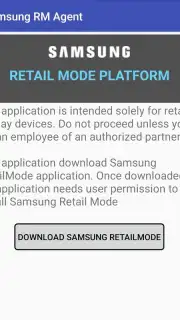
Description Samsung Retail Mode
Imagine purchasing a Samsung smartphone, only to discover it’s locked in a persistent demo mode, restricting your access to core functions and personalization. This is a common scenario with retail display units, where Samsung Retail Mode is pre-activated to create a controlled, looped demonstration experience. This built-in system application is the key to transitioning your device from a limited store model to a fully functional personal smartphone.
Core Functionality and Operational Process
Samsung Retail Mode is a proprietary system tool embedded in the hardware of Samsung smartphones, specifically designed to manage the demonstration state on retail and display devices. Its primary function is to toggle the demo configuration on or off, effectively unlocking the complete Android operating system for standard consumer use. The process involves accessing the pre-installed application and executing a specific deactivation sequence to restore the device to its factory default consumer settings, thereby removing all retail limitations.
The procedure to disable this mode is systematic. Users must first launch the Samsung Retail Mode application from their device's app menu or settings. Within the interface, a security verification step is required, typically involving the entry of a numeric authorization code such as 5444 into a designated field. Following successful entry, the application’s settings menu becomes fully accessible, allowing the user to navigate to and initiate the factory reset command for the retail mode framework, which does not affect personal data on a consumer device but resets the demo parameters.
Complete Feature Overview and Device Compatibility
- Permanently disable demonstration loops and retail restrictions on Samsung smartphones with a verified security code.
- Execute a targeted factory reset for the retail mode framework without a full device wipe on consumer units.
- Utilize the alphanumeric authorization key M729Q16K8546 to finalize the deactivation process after initial setup.
- Restore full access to all hardware features, settings menus, and personalization options blocked by demo mode.
- Compatible with a wide range of models including the Galaxy S22 series, Fold 3, S9, and other Samsung devices.
Subsequent to the initial reset, the system may prompt for a final password to complete the deactivation. In the provided workflow, entering the alphanumeric combination M729Q16K8546 into the confirmation dialog box permanently disables the retail mode. This process ensures the smartphone operates without the pre-set demo limitations, animations, or volume restrictions. For devices where the application is not present, obtaining the official Samsung Retail Mode APK file for Android enables the same functionality, allowing users to unlock the full potential of their device and experience all features intended by the manufacturer.
Gain immediate control of your device and remove all software limitations. Download the mobile app now to unlock your smartphone's full potential!
Internet required. IAP available.
Information
| Version | 20.6.20210401 |
| Developer | Samsung Corporation |
| Requirements | Android Android + 5.0+ |
| Updated | 17.03.2026 |
| Size | 4.81 MB |
| Package | com.samsung.rms.retailagent.global |
| Signature | d087e72912fba064cafa78dc34aea839 |
| Architecture | armeabi-v7a, arm64-v8a |


