


Shadow PC screenshots (3)
Description Shadow PC
Shadow PC Review: A Full Windows Desktop, Streamed to Your Android Device
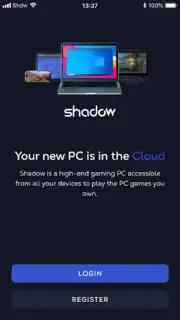
Shadow PC is not merely another cloud gaming service; it is a complete, high-performance Windows 10 or 11 PC virtualized in the cloud and streamed directly to your Android screen. This fundamental distinction means you are not limited to a curated game library. Instead, you are renting a remote desktop with dedicated, high-end hardware, granting you the full freedom of a personal computer. You install your own software, configure your own settings, and access your entire existing digital ecosystem—from game launchers like Steam and Epic Games Store to professional creative suites and standard desktop applications. The experience is engineered for low-latency interaction, translating your touch or controller inputs into seamless on-screen action, provided you have a stable, high-speed internet connection.
The core mechanics revolve around subscription-based access to various hardware tiers. Upon launching the app and logging in—a process streamlined with Google account integration—you connect to your assigned remote machine. The available plans, such as Boost, Classic, Core, Neo, and Power, are differentiated primarily by their GPU capabilities and associated RAM/CPU power. For instance, the top-tier Power subscription provisions a workstation-grade NVIDIA RTX A4500 with 20GB of dedicated VRAM, enabling ultra-settings gameplay at high resolutions and support for demanding professional rendering tasks. This granularity allows users to select a plan that matches their performance needs, whether for competitive esports titles or graphics-intensive simulation games.
Critical Features and User Workflow Analysis
Operationally, Shadow PC excels in providing a blank-slate Windows environment. This means the service does not provide games; it provides the powerful hardware to run them. The user is responsible for logging into their various game distribution accounts, installing titles, and managing their virtual desktop—identical to managing a physical PC. The advantage is unparalleled library compatibility, encompassing every PC game you own, including moddable titles and early access games often excluded from other cloud platforms. The Android app acts as a sophisticated portal, with customizable on-screen touch controls, support for Bluetooth controllers and mice, and graphical fidelity settings to optimize the stream for your network conditions.
- Access a full, high-performance Windows 10/11 desktop from any Android device, anywhere.
- Choose from multiple subscription tiers (Boost, Core, Neo, Power) with dedicated GPUs like the NVIDIA RTX A4500.
- Play your entire existing library from Steam, Epic Games, GOG, Origin, Xbox PC, and others.
- Utilize the platform for both high-fidelity gaming and professional Windows software applications.
- Experience a clean, ad-free interface with customizable touch controls and peripheral support.
This model places control firmly in the user's hands but requires a proactive setup. For the dedicated PC gamer or power user, this is a significant benefit, not a drawback. It transforms your phone or tablet into a genuine gaming rig capable of running titles that would normally require a thousand-dollar desktop. The performance is entirely contingent on the selected subscription plan and the quality of your internet connection, with low latency being the most critical factor for a responsive experience.
Download the Shadow PC mobile app now and transform your Android device into a portable gaming powerhouse! Stop being limited by your local hardware—unlock a top-tier PC experience immediately.
Internet required. IAP available.
Information
| Version | 3.32.1 |
| Developer | Shadow SAS. |
| Requirements | Android Android + 5.0+ |
| Updated | 17.03.2026 |
| Size | 27.8 MB |
| Package | com.blade.shadowcloudgaming |
| Signature | 1067bdf3783ba14ade52fcf53a1efc15 |
| Architecture | arm64-v8a |


