

Sidebar Launcher screenshots (4)
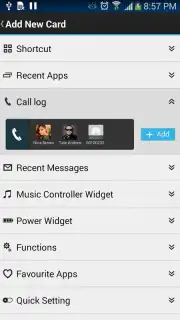
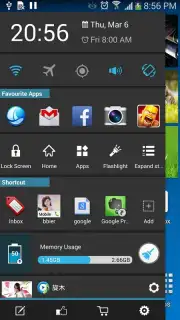
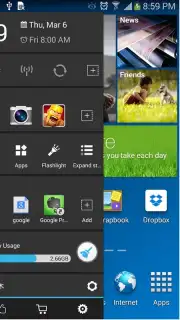
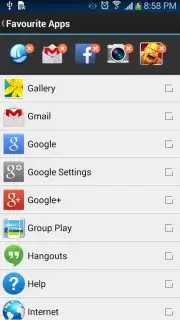
Description Sidebar Launcher
Tired of Digging Through Menus? Your Phone Just Got a Secret Side Door.
Imagine if your phone had a hidden control panel, always one swipe away. No more fumbling through settings to toggle Wi-Fi, hunting for your favorite app in a cluttered drawer, or struggling to adjust volume at the wrong moment. That's the reality Sidebar Launcher creates. It transforms the empty space on the edge of your screen into a powerful, personalized command center, saving you precious seconds countless times a day. Think of it as giving your Android device a supercharged shortcut sidebar that’s both brilliantly simple and deeply customizable.
This isn't just another widget. Sidebar Launcher integrates so seamlessly it feels like a native part of your operating system. The moment you swipe it open, you're greeted with essential, at-a-glance information: the current time, today's date, and even the time of your next alarm, so you're always informed. Directly below, instant toggle switches put flight mode, GPS, and Wi-Fi connectivity literally at your fingertips. Need to quickly mute your phone in a meeting? A dedicated volume slider is right there, saving you from awkward button presses.
But the true magic happens when you make it your own. Beyond these core utilities, Sidebar Launcher becomes an extension of your personal workflow.
- Your App Launchpad: Pin your most-used apps for one-tap access. Whether it's your messaging app, calendar, or camera, your digital essentials are never more than a swipe away, bypassing your home screen entirely.
- Virtual Command Buttons: Execute common device actions without touching a physical button. Program your sidebar to go to your home screen, lock your device, adjust screen brightness, or control media playback.
- Perfect Harmony: Designed for compatibility, it works smoothly alongside your existing launchers and apps without conflict.
- Tailor the Fit: Don't like how much screen space it uses? Dive into the settings and precisely adjust the panel's width and activation area until it feels perfectly natural for your thumb and your device.
It’s the ultimate tool for anyone who values efficiency, offering a turbo-charged way to interact with your phone that quickly becomes indispensable. You stop managing your device and start commanding it.
We suggest trying Sidebar Launcher today to experience a significantly smoother and faster mobile workflow. Consider downloading it now and feel the immediate difference a truly smart shortcut can make.
Download Sidebar Launcher now
Disclaimer: This application requires an internet connection for initial download and potential updates. The app may offer in-app purchases for premium features. Please be aware of your mobile data usage. Some features may require specific device permissions to function correctly. This tool is intended for general use; please assess if it is suitable for your age and needs.
Information
| Version | 3.4.3 |
| Developer | Digital Life International. |
| Requirements | Android Android + 2.3, 2.3.1, 2.3.2+ |
| Updated | 17.03.2026 |
| Size | 6.27 MB |
| Package | com.boatmob.sidebarlauncher |
| Signature | 8a307dcf2ff649a31b497463c442492f |
| Architecture | universal |


