


Smart App Lock screenshots (6)
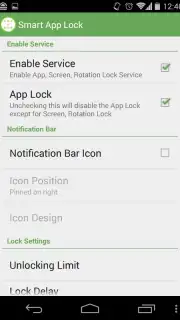
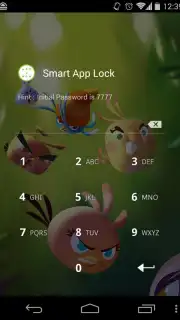
Description Smart App Lock
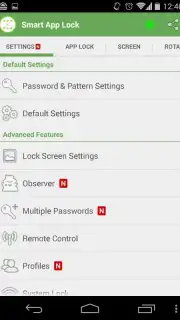
Imagine handing your unlocked phone to a colleague for a quick photo, only to feel a pang of anxiety about the private messages and apps just a tap away. Smart App Lock by spSoft addresses this exact scenario, functioning as a digital gatekeeper for your Android device. This utility app operates by creating virtual barriers, allowing you to selectively password-protect any application installed on your system. Its core mechanics are built around two distinct, configurable security layers that work independently or in tandem to control access.
Core Security Mechanics and Operational Analysis
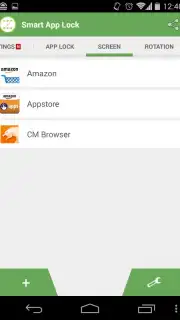
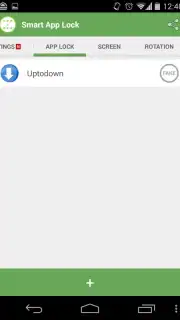
The application provides two primary operational modes. The first is a screen protection feature designed to manage visibility, enabling you to hide specific application icons from the device's lock screen and launcher to reduce their discoverability. The second and more sophisticated mode is application locking. This function allows you to place a virtual lock—secured by a password, PIN, or pattern—on any individual app, from messaging clients and galleries to banking and email applications.
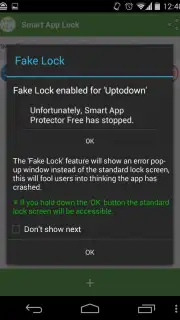
A notable functional detail within the app-locking mode is its decoy error system. When an unauthorized user attempts to open a locked application, the software does not simply show a password prompt. Instead, it displays a simulated error message, suggesting the app has crashed or failed to load. The legitimate user can bypass this facade by long-pressing the 'OK' button on the error dialog for several seconds, which then reveals the actual authentication gate. This provides a layer of plausible deniability and deters further attempts.
The developer notes that the standard version may include advertisements, but highlights an enhanced 'Turbo' experience. This optional state is described as removing all advertisements and potentially unlocking performance or feature advantages, framing it as a premium tier within the application's ecosystem.
Detailed Feature Breakdown
- Implements dual-layer security with screen hiding and per-app locking mechanisms.
- Features a decoy error message system to mislead unauthorized access attempts.
- Allows protection for any application using a password, PIN, or pattern lock.
- Provides a secret bypass via long-press on error dialogues for authenticated users.
- Offers an ad-free Turbo mode for uninterrupted performance and potential extra features.
This tool is designed for users seeking granular control over application access on a shared or frequently handled device, transforming standard app icons into secured endpoints.
Get your private apps secured and start using the decoy system today.
Internet required. IAP available.
Information
| Version | 7.9.40 |
| Developer | spSoft |
| Requirements | Android Android + 4.4+ |
| Updated | 17.03.2026 |
| Size | 7.74 MB |
| Package | com.sp.protector.free |
| Signature | f80558c79b55001a7da420725415803e |
| Architecture | armeabi, armeabi-v7a, x86, arm64-v8a, x86_64 |


