

Squawk screenshots (6)
Description Squawk
Move Beyond Basic Checklists with a Task Management System That Actually Works
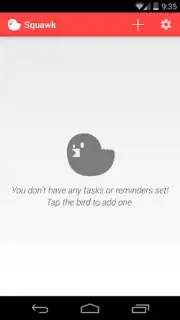
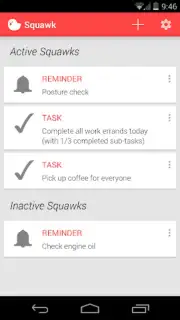
Traditional to-do apps fail because they rely on passive notifications you can easily ignore. Squawk redefines personal productivity by introducing an active, context-aware task management system built on persistent card-based alerts. This application replaces forgettable list items with dynamic "Squawks"—visual reminders that demand attention through a unique, elegant interface designed to integrate into your device's unlock sequence. It eliminates the clutter of standard planners by making task management a natural part of your device interaction, not a separate chore you have to remember to check.
Core Functionality: Intelligent Alert and Task Architecture
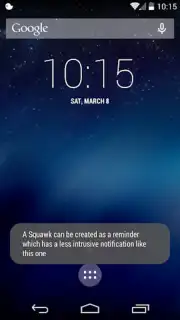
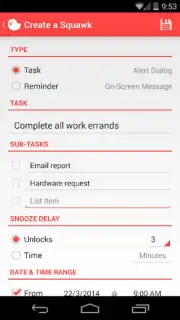
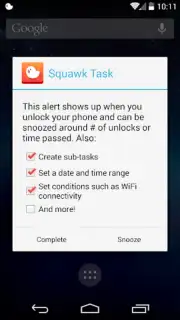
Squawk operates on a principle of gentle persistence rather than intrusive alarms. The core unit is a visual card that presents your task. You create these tasks with the option to attach a full-screen dialog alert for critical reminders or a less intrusive on-screen message for casual notes. The system's fundamental innovation is its delay trigger. You can configure any Squawk to reappear only after a specific number of device unlocks or a set amount of minutes, creating a flexible, recurring nudge that aligns with your natural phone usage patterns. The free version provides substantial utility by supporting the management of up to 15 active Squawks simultaneously for diverse obligations.
Advanced Scheduling and Contextual Activation
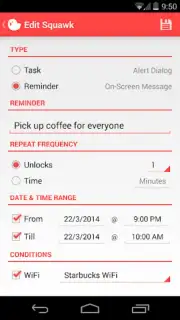
Precision planning is handled through Squawk's sophisticated scheduling engine. This allows you to activate tasks within specific date and time windows, ensuring reminders trigger at the exact moment they are most relevant to your calendar. Beyond simple timing, the application introduces conditional activation based on your physical location's network. You can set a Squawk to become active only when your device connects to a designated Wi-Fi access point, such as your home, office, or a frequented cafe. This ensures reminders for context-specific tasks—like "submit report" at work or "water plants" at home—appear precisely when and where you can act on them, adding a layer of automated environmental intelligence to your planning.
Detailed Project Breakdown with Subtask Support
For complex project management, Squawk supports hierarchical task organization through subtasks. This feature enables you to break down large, overarching goals into smaller, actionable components, all contained within a primary task card. Whether organizing a multi-stage work project or a detailed personal event, this structured approach prevents oversight and provides a clear roadmap to completion. It transforms the app from a simple reminder tool into a comprehensive workflow optimizer, maintaining clarity and focus by keeping all related micro-tasks logically grouped and manageable.
- Persistent card-based task interface
- Conditional Wi-Fi location triggers
- Delay reminders by unlocks or minutes
- Create subtasks for complex projects
- Schedule precise date/time windows
Start commanding your schedule and experience task management that adapts to your life. Download Squawk now and convert your intentions into completed actions.
Heads up: you'll need wifi for the location-based trigger features. Some advanced scheduling and capacity options are part of the premium Turbo upgrade.
Information
| Version | 2.2.5 |
| Developer | Roman Tymchyk |
| Requirements | Android Android + 4.0, 4.0.1, 4.0.2+ |
| Updated | 17.03.2026 |
| Size | 2.06 MB |
| Package | com.romantymchyk.squawk |
| Signature | 43b54cc48f3c17dd9a3b304fa1662097 |


