


SwiftTask screenshots (5)

Description SwiftTask
A Day in the Life of a Modern Professional
Imagine a typical Tuesday: your calendar is a mosaic of meetings, your inbox a torrent of requests, and your mental checklist is fraying at the edges. It’s in this landscape of modern cognitive overload that a tool like SwiftTask by developer Sebastian Schäf finds its purpose. This isn't merely another digital notepad; it's a structured system designed to externalize and organize the chaos of daily obligations, transforming fleeting thoughts into actionable, manageable items. The core premise addresses a universal pain point—the reliance on fallible memory—by providing a dedicated, always-available repository for every commitment, from critical project milestones to the trivial errand easily forgotten by noon.
Functionality Beyond Basic Listing
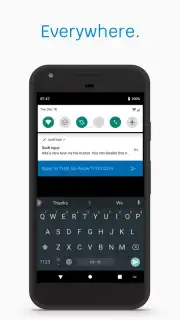
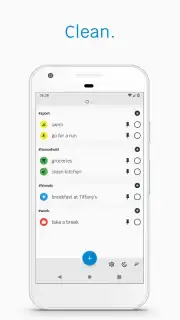
SwiftTask distinguishes itself by moving past simple list-making into the realm of contextual task management. The application allows for the enrichment of each entry with metadata that provides immediate visual and categorical clarity. You can assign custom labels to create project-based or context-based categories, enabling a filtered view of your workload. More intuitively, the option to tag tasks with emojis offers an at-a-glance emotional or priority coding system—a red flag for urgent items, a checkmark for administrative duties—making list scanning significantly faster and more intuitive.
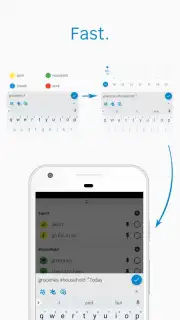
Further granularity is achieved through a streamlined syntax for adding critical details. By prefixing a date with an asterisk, you can set a deadline or a reminder day directly within the task line itself. Similarly, using the '@' symbol allows you to denote a location or a specific context, such as '@office' or '@calls'. This method of inline tagging means all pertinent information is embedded within the primary task view, eliminating the need to open multiple edit screens and facilitating powerful search and filtering operations later. The cumulative effect is a highly personalized and searchable task database.
A Closer Look at the Features
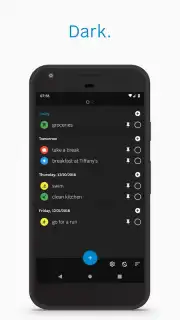
The application’s design acknowledges that task management doesn’t adhere to a strict nine-to-five schedule. Consequently, it includes a dedicated dark mode interface. This feature is more than an aesthetic choice; it’s a functional one, aimed at reducing eye strain during late-night planning sessions or early-morning reviews without disrupting your readiness for sleep with harsh blue light. The overall experience is streamlined by the developer’s commitment to an ad-free environment, with advanced features gated behind a single 'Turbo' upgrade, preserving a clean, focused user interface for all users.
- Rich Task Enrichment: Go beyond text by adding custom labels and intuitive emojis for instant visual categorization and priority recognition.
- Inline Syntax for Efficiency: Use simple symbols like '*' for dates and '@' for locations to embed details directly into task lines.
- Powerful Search and Filter: Leverage your added metadata to quickly surface all tasks for a specific project, location, or deadline.
- Dark Mode Interface: A dedicated night theme reduces eye strain during evening use, supporting better sleep hygiene.
- Ad-Free Core Experience: Focus on your tasks without disruptive advertisements, with advanced functionality available via a clear upgrade path.
We suggest trying SwiftTask if your current method of tracking responsibilities involves scattered notes, mental gymnastics, or overwhelming monolithic lists. It provides a structured yet flexible middle ground.
Download the SwiftTask mobile app now to systemize your workflow.
Heads up: you'll need wifi for initial download and updates. Some cool stuff, like advanced sorting and cloud backup, is part of the optional Turbo upgrade.
Information
| Version | 1.4.7 |
| Developer | Sebastian Schäf |
| Requirements | Android Android + 5.0+ |
| Updated | 17.03.2026 |
| Size | 4.07 MB |
| Package | com.sebschaef.swifttask |
| Signature | d152317c602fef3490c578033e685caa |


