


Time Cut : Smooth Slow Motion screenshots (8)






Description Time Cut : Smooth Slow Motion
Struggling to Create Professional Slow-Motion Videos on Your Phone?
Standard video editors often produce choppy, low-quality slow-motion effects that ruin the moment you're trying to highlight. Time Cut: Smooth Slow Motion is a specialized mobile editor built to solve this exact problem. It utilizes advanced frame interpolation technology to transform your standard clips into fluid, high-quality slow-motion or time-ramped sequences, allowing for precise control over the pacing and drama of any video.
Core Functionality for Advanced Time Manipulation
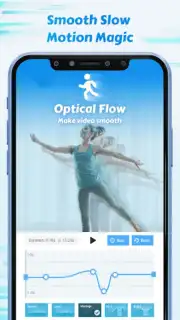
This application functions as a dedicated tool for temporal editing, bypassing basic filters for deep technical control. Its processing is built around AI-driven models like Optical Flow and RIFE, which analyze motion between frames to generate new, intermediate frames. This method is what enables significant speed reductions without the classic stuttering or loss of smoothness. The interface provides direct access to professional-grade parameters, moving beyond simple sliders to offer a curve-based editing experience for speed.
- Custom Speed Curve & Slow-Motion Editor: Manipulate video tempo with a graphical speed curve editor. Set precise keyframes to create gradual slowdowns, sudden freezes, or accelerated bursts, with access to preset speed change profiles for rapid application.
- AI-Powered Motion Blur Effects: Apply directional motion blur calculated by Optical Flow analysis. This adds realistic motion streaks to fast-moving objects, enhancing the perceived smoothness and professional quality of speed-altered footage.
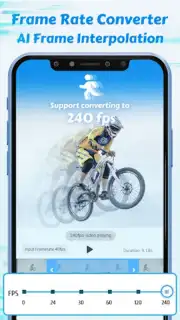
- Intelligent Frame Rate Converter: Upscale standard video playback to 60, 120, or 240 frames per second (FPS) for ultra-smooth slow motion. Conversely, convert high-frame-rate footage to cinematic 24 or 30 FPS for standardized sharing, maintaining fluid motion throughout the conversion.
- AI Image Quality Enhancer: Process video frames through an AI model designed to upscale resolution, reduce noise, and improve overall clarity. This tool is intended to refine footage before or after speed adjustments to ensure the final edit maintains visual integrity.
- Highlight FX & Creative Tools: Isolate specific moments within a clip using simple selection tools. Apply creative effects like glitch, zoom, or color highlights directly to these selected areas to emphasize key actions or pivotal scenes in the frame.
The utility extends beyond standard slow-motion for sports replays. It is engineered for content creators needing precise time manipulation for platform-specific formats, whether it's crafting a dramatic slowdown for a YouTube intro, producing a seamless action sequence for TikTok, or generating a highlight GIF for social media messaging. The processing preserves detail during these transformations, aiming to keep the final output suitable for high-resolution viewing.
We Suggest Trying This Advanced Video Tool
Consider downloading Time Cut: Smooth Slow Motion if you require granular control over video speed and professional motion effects directly on your mobile device. It provides a technical solution for transforming ordinary clips into dynamic, slow-motion content.
Download the Time Cut: Smooth Slow Motion mobile app now.
Technical Disclaimer: This application requires an internet connection for certain AI-powered processing features and potential in-app purchases. Data usage charges may apply during video upload and processing. Performance is dependent on device hardware specifications. Users are responsible for complying with the terms of use of their source video content. Age restrictions may apply due to social media sharing functionalities.
Information
| Version | 2.6.0 |
| Developer | changpeng |
| Requirements | Android Android + 5.0+ |
| Updated | 17.03.2026 |
| Size | 78.94 MB |
| Package | com.accarunit.slowmotion |
| Signature | e1f4a0284961f268471f8c4eaf7981e7 |
| Architecture | armeabi-v7a, arm64-v8a |


