

Tomi File Manager screenshots (6)


Description Tomi File Manager
Struggling with a cluttered phone? Find files instantly with this intuitive manager.
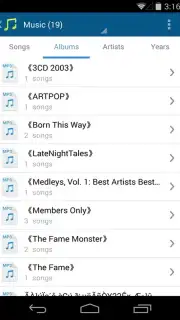
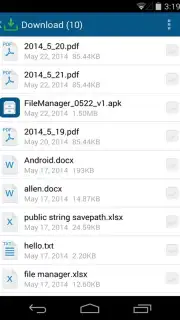
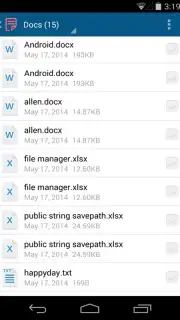
Most Android file managers are either overloaded with complex features or frustratingly basic, making simple file access a chore. Tomi File Manager cuts through the clutter with a streamlined, visual approach. It automatically scans and organizes your entire internal storage and SD card, presenting your files not as a confusing directory tree, but sorted neatly by type. This means all your photos, videos, documents, music, and archives are grouped together in dedicated, easy-to-browse sections from the moment you open the app. You don't need to remember folder paths or filenames—just tap the category for what you want to see.
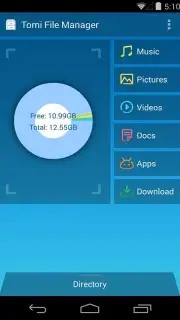
Beyond smart categorization, the app provides powerful tools for managing your device's storage. It displays a clear, visual breakdown of how much space each file type consumes, helping you quickly identify and remove large, unwanted items to free up gigabytes. While it intelligently groups files by type for your convenience, it also shows the original folder path for full transparency. Management is straightforward: select any file or use the folder-level actions to delete, move, copy, or share multiple items in just a few taps. The entire experience is designed for speed and simplicity, powered by its optimized Turbo engine, and is completely free with zero advertisements.
- Smart Auto-Categorization: Instantly groups all files by type—photos, videos, music, docs, and more—for visual browsing.
- Storage Analyzer & Cleaner: Visualizes storage usage by file category to quickly find and delete space-hogging files.
- Simplified Folder Management: Perform batch actions like delete, move, or copy directly from grouped folder views.
- Full File Path Visibility: See the original location of every auto-grouped file while enjoying simplified access.
- Lightweight & Ad-Free Experience: Built with a Turbo engine for fast performance and contains no advertisements.
We suggest trying Tomi File Manager for a genuinely streamlined way to take control of your phone's storage and find any file in seconds. Consider downloading it today to replace your default file explorer.
Internet required. IAP available.
Information
| Version | 2.3.4 |
| Developer | tomitools |
| Updated | 17.03.2026 |
| Size | 5.99 MB |
| Package | com.tomitools.filemanager |
| Signature | d75ab27c16284ca6976b6d79af0ffdc0 |
| Architecture | armeabi, x86 |


