

TubeMate screenshots (10)





Description TubeMate
The Problem of Ephemeral Content: When Videos and Music Disappear Online
In an era where digital content is both ubiquitous and transient, users face a persistent frustration: the removal of videos or songs by creators or platforms. This creates a gap in personal media libraries, leaving favorite content inaccessible just when you want it. The core challenge is finding a reliable method to preserve audio and video from various online sources in a format and quality of your choosing, without being tethered to an internet connection or at the mercy of a platform's content policies. This review examines TubeMate (version 3.4.20.1544 by Devian Studio), a dedicated utility application that addresses this specific need through direct download functionality.
A Technical Analysis of TubeMate's Download Mechanics
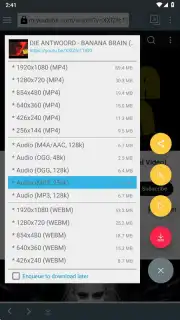
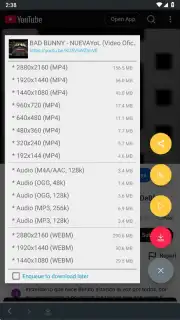
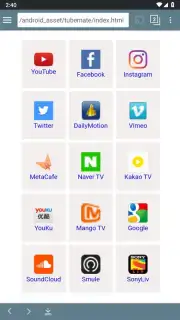
TubeMate operates as a specialized download manager with a media-focused interface. Upon first launch, a concise tutorial outlines the basic workflow. The primary navigation begins with a menu button in the upper-left corner, which reveals a comprehensive list of supported multimedia websites and social networks from which downloads can be initiated. The process is methodical: you search for the desired video or audio track within the app, and after a brief processing period, a distinct red pop-up button appears in the lower-right corner of the screen. Tapping this button reveals all available download options for that specific piece of content. The application's design prioritizes this core function, minimizing clutter to streamline the conversion of online streams into local files.
A significant operational note is the absence of display advertising within the app's interface, a feature often highlighted as part of its "Turbo" experience. This results in an uninterrupted user session focused solely on managing downloads. The true technical flexibility of TubeMate is demonstrated in its format and quality selection. Users are presented with a granular choice of output containers, including MP4, MP3, AAC, OGG, and WEBM. For audio, bitrate options typically range from 48kbps to 256kbps, allowing for a balance between file size and fidelity. For video, available resolutions depend on the source but can include 144p, 240p, 480p, 720p, and 1080p, giving direct control over the storage footprint of each downloaded file.
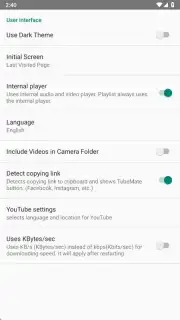
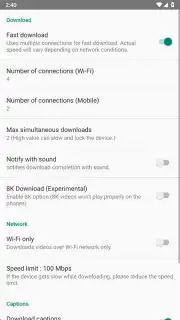
The settings menu, accessed via a gear icon, provides extensive configuration. Users can define a default storage directory and set parameters under "Download Options." These include restricting downloads to Wi-Fi only, setting a maximum speed limit to manage bandwidth, enabling the download of available subtitles, and toggling support for very high-resolution formats like 8K where available. Separate interface settings allow for visual customization, such as activating a dark mode, changing the application's theme, and setting the display language. Compared to its predecessor, TubeMate2, this third iteration maintains identical core functionality and platform support but delivers a more modern, visually organized interface and settings structure, representing a refinement in user experience rather than a feature expansion.
- Multi-Source Downloader: Accesses and processes video and audio content from a wide array of listed multimedia websites and social media platforms directly within the app.
- Granular Format & Quality Control: Offers specific output format selection (MP4, MP3, AAC, OGG, WEBM) and precise quality choices for both audio bitrate and video resolution.
- Advanced Download Management: Features configurable options including Wi-Fi-only restrictions, download speed limiting, subtitle fetching, and high-resolution format support.
- Ad-Free Interface & Customization: Provides an uninterrupted "Turbo" experience with no display ads and includes theme, dark mode, and language settings.
- Local Media Archiving: Enables reliable, offline storage of content on your device, safeguarding against online removal and providing permanent access.
If your media consumption is hindered by buffering, data limits, or the fear of content vanishing, this tool provides a concrete technical solution. We suggest trying TubeMate for its direct, configurable approach to building a permanent, personal media library from online sources.
Download the TubeMate mobile app now to take direct control of your media collection.
Note: The application requires an internet connection for its download functionality. Please be aware of the storage capacity on your device and ensure you have the necessary permissions for file management. Compliance with copyright laws and the terms of service of source platforms is the responsibility of the end-user.
Information
| Version | 3.4.20.1544 |
| Developer | Devian Studio |
| Requirements | Android Android + 4.4+ |
| Updated | 17.03.2026 |
| Size | 25.89 MB |
| Package | devian.tubemate.v3 |
| Signature | 03f6f10afd257e023288d079e3035955 |
| Architecture | armeabi-v7a, arm64-v8a |


