

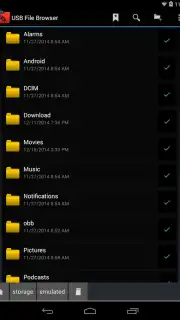
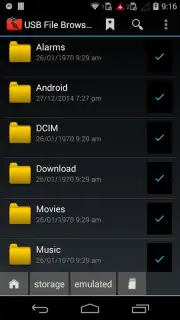
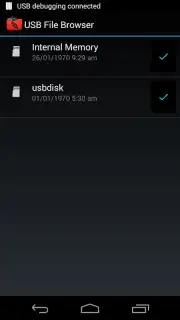
USB File Browser screenshots (4)
Description USB File Browser
The Unseen Library in Your Pocket
Every Android device with a USB OTG port holds a hidden potential that most file managers cannot access. When you connect a flash drive, external hard drive, or even a digital camera, the standard system tools often present a frustrating barrier. This application transforms that port from a simple connector into a fully functional, high-speed data terminal, granting you direct administrative control over external storage as if it were a native part of your device's file system.
Core Functionality and Operational Mechanics
USB File Browser operates as a dedicated file management utility designed explicitly for USB On-The-Go (OTG) and external storage protocols. Upon launching, it automatically detects any compatible storage device connected via the OTG adapter. The interface presents a dual-pane view or a detailed list structure, allowing for efficient navigation between the device's internal storage and the mounted external volume. Core operations include copying, moving, deleting, renaming, and archiving files and folders across these storage boundaries. It supports a comprehensive range of file systems including FAT32, exFAT, and NTFS, ensuring compatibility with drives formatted on Windows, macOS, or other platforms. The application includes a built-in media player for previewing audio and video files directly from external drives, a text editor for documents, and an image viewer, eliminating the need to first transfer files for basic review.
Technical Advantages and User Experience
The primary strength of this tool lies in its raw, unfiltered access and stability. It bypasses the often restrictive or incomplete OTG support found in generic file managers, providing reliable read and write speeds that maximize the potential of your USB 3.0 drives. The user interface is purposefully utilitarian, focusing on clear directory trees, detailed file metadata (size, type, modification date), and responsive touch controls for selection and action menus. Performance is optimized for handling large file transfers, such as moving video libraries or backing up photo collections, with a background process indicator and transfer queue. Its self-contained nature means it requires no complex setup or root access, functioning immediately upon installation with any standard OTG cable.
- Direct USB OTG storage access
- Full file system compatibility
- Integrated media preview tools
- High-speed file transfer operations
Download this mobile app now and unlock the full data management capacity of your Android device. Stop relying on compromised workarounds and gain complete control immediately.
Disclaimer: This application requires an internet connection for initial download and potential updates. It functions with standard USB OTG hardware; compatibility with specific storage devices depends on their file system and your Android device's kernel support. The app may contain optional in-app purchases for advanced features. Persistent use may consume significant battery and data resources during large file operations. Use in accordance with your device's manufacturer guidelines and applicable age restrictions.
Information
| Version | 1.0 |
| Developer | USB OTG APPS |
| Requirements | Android Android + 3.1.x+ |
| Updated | 17.03.2026 |
| Size | 2.33 MB |
| Package | com.usbapps.filebrowser |
| Signature | 27b2ed581c84d69add34448f03865597 |
| Architecture | armeabi |


