


Vertical Gallery screenshots (8)





Description Vertical Gallery
Is Your Default Photo Gallery Feeling Outdated and Bloated?
For many Android users, the built-in gallery app that came with their device, particularly the version from the Android 4.4 KitKat era, remains a benchmark for simplicity and speed. Yet, modern phones often replace it with heavier, ad-laden alternatives. What if you could regain that streamlined efficiency with significantly enhanced capabilities? Vertical Gallery by Mobsnake directly addresses this need. It is not merely a gallery viewer; it is a focused, lightweight photo management suite that revives the classic two-column layout philosophy while integrating a robust, immediate set of editing tools. This application positions itself as a dedicated utility, prioritizing performance and user control over social features or cloud integration, making it a compelling tool for users who store and manage photos directly on their device.
Core Functionality and User Experience
Vertical Gallery operates on a principle of immediate clarity and efficiency. Upon launch, the interface presents all images and folders in a clean, two-column vertical grid, automatically sorted by the latest modification date. This structure intuitively surfaces your most recent camera shots without requiring navigation through nested menus. Tapping any thumbnail opens the image in a dedicated viewer, initiating the core interaction loop. The transition is designed to be seamless, maintaining the app's characteristic smooth performance even with high-resolution images. Beyond viewing, the app reveals its depth through a comprehensive editing panel that activates for any opened photo. This panel is not a gateway to a separate module but an integrated set of tools allowing for on-the-fly adjustments including precise cropping, resizing, white balance correction, and contrast enhancement.
A Closer Look at Editing and Customization
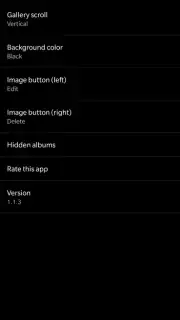
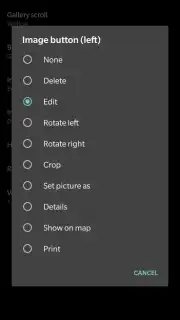
Where Vertical Gallery distinguishes itself from other lightweight galleries is in the breadth and accessibility of its post-processing features. The editing suite is surprisingly extensive for an app of its size. Users can apply over a dozen one-tap visual filters, add decorative frames, and perform fundamental color corrections without leaving the gallery environment. Any edits create a new copy of the image, preserving the original file—a critical feature for non-destructive editing. Furthermore, the application offers a tangible degree of personalization within its settings menu. Users are not locked into a single visual theme; they can alter the overall interface aesthetics to better suit their preference, a level of customization rarely found in default gallery applications. This combination of a low storage footprint, an ad-free experience often enabled by its optional "Turbo" mode, and potent, integrated tools makes it a singular proposition in the photography utility category.
- Legacy-Inspired, Optimized Layout: Features a fast, two-column vertical grid that sorts all photos and folders by latest modification, ensuring immediate access to newest images with smooth, resource-light operation.
- Integrated Advanced Editing Suite: Provides a full panel of editing tools including crop, resize, white balance, contrast, frames, and over a dozen one-tap filters for instant photo enhancement directly within the viewer.
- Fully Customizable Ad-Free Interface: Allows users to change the overall theme and appearance of the gallery in settings and offers an ad-free experience, maintaining focus on photo management without distractions.
We suggest trying Vertical Gallery if you seek a powerful, no-nonsense replacement for your device's default photo manager that combines classic efficiency with modern editing tools. Consider downloading it to handle your local photo library with unprecedented speed and control.
Download mobile app now.
Disclaimer: The application requires an internet connection for certain functions and may contain in-app purchases.
Information
| Version | 1.8.1 |
| Developer | Mobsnake |
| Requirements | Android Android + 5.0+ |
| Updated | 17.03.2026 |
| Size | 5.21 MB |
| Package | com.mobsnake.verticalgallery |
| Signature | 1122866ebcb00c3126f8374a5783c940 |
| Architecture | armeabi-v7a, x86, arm64-v8a, x86_64 |


