

VidCombo: All Video Downloader screenshots (6)


Description VidCombo: All Video Downloader
Your Phone Deserves a Universal Video Downloader
Tired of juggling different apps just to save a video? Your search ends here. This tool transforms your device into a powerful media hub, giving you direct control over content from virtually any platform you use daily. Imagine having a personal library of videos and music, saved directly on your phone, ready to watch or listen to anytime—without ads, buffering, or needing an internet connection. That’s the level of convenience and freedom you unlock.
Experience Uninterrupted Media Control
This application is engineered for efficiency and simplicity, stripping away the complexity often associated with video downloading. You gain a streamlined process that handles the technical details for you, from link recognition to format conversion. The interface presents everything clearly, so you spend less time figuring things out and more time enjoying your content. It’s built with a focus on performance, ensuring downloads are quick and reliable, while giving you the high-quality results you expect.
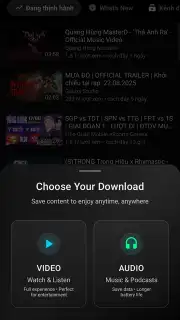
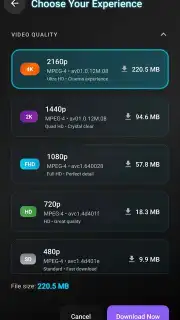
- High-Definition Downloads: Capture video in the best quality available, from standard HD up to stunning 4K resolution, preserving every detail of the original content.
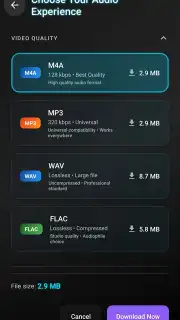
- Extract Pure Audio: Easily save just the audio track from any video as an MP3 file, perfect for creating music playlists or listening to podcasts offline.
- Intuitive, Clean Interface: Navigate effortlessly with a design that puts all functions within easy reach, making the download process straightforward for everyone.
- Integrated File Manager: Organize your library directly within the app. View, rename, sort, or delete your downloaded files without ever switching to another application.
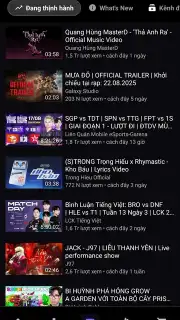
- Extensive Platform Support: Works seamlessly with a vast array of sites including YouTube, Facebook, Instagram, TikTok, Twitter, and many more.
- Privacy-First Operation: Use the service with confidence, as it operates without collecting your personal data, focusing solely on the download task.
How to Build Your Offline Library in Seconds
The process is designed to be as simple as copy and paste. You don’t need any technical knowledge to get started.
- First, copy the shareable link of your desired video from any app or browser on your phone.
- Open the downloader—it will automatically detect the copied link and prepare it for download.
- Select your preferred video quality and file format from the available options presented.
- Tap the download button, and your file will be saved directly to your device’s local storage.
We suggest trying VidCombo: All Video Downloader to experience this seamless control over your favorite online videos and audio. Consider downloading it today to start building your personal, offline media collection.
Heads up: you'll need a wifi connection for downloading content. Access to the highest resolution formats like 4K and an ad-free experience are part of the optional premium features.
Information
| Version | 6.0.0 |
| Developer | Vidcombo |
| Requirements | Android Android + 5.0+ |
| Updated | 17.03.2026 |
| Size | 30.92 MB |
| Package | vidcombo.video.downloader |
| Signature | 49c846dd5e68b0ec66aa6b269b6b322c |
| Architecture | armeabi-v7a, arm64-v8a |


