

Wi-File Manager screenshots (4)

Description Wi-File Manager
Tired of hunting for cables or dealing with slow Bluetooth when you need to move files from your Android phone to your computer? What if you could establish a direct, high-speed transfer lane using the Wi-Fi network that’s already in your home or office?
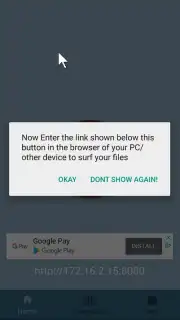
Wi-File Manager turns that idea into a seamless reality. This utility creates a private, local web server on your Android device, allowing any computer with a web browser to connect and manage files directly. The process is refreshingly straightforward: simply ensure both your phone and computer are on the same Wi-Fi network, launch the app to get a unique local IP address, and enter that address into your computer's browser. This instantly grants you a clean, organized interface to upload files to your phone or download photos, videos, documents, and entire folders from it. The connection is direct between devices, which typically allows for faster transfer speeds than cloud-based intermediaries, and it operates locally without using your mobile data.
Core Functionality & User Benefits
Wi-File Manager excels by providing a cable-free bridge for your digital content. It transforms your phone into a accessible network drive, putting you in full control of your file transfers without needing to install any software on your computer.
- Establish a direct Wi-Fi transfer bridge between your Android device and any computer with a web browser.
- View a unique local IP address in-app and enter it into your PC’s browser to initiate a secure connection.
- Upload files from your computer to your phone or download entire folders directly through the browser interface.
- Manage transfers without mobile data usage by keeping all traffic on your local Wi-Fi network.
- Experience streamlined file management with a simple start command and clear on-screen instructions.
We suggest trying Wi-File Manager for anyone who regularly needs to move large batches of photos, backup documents, or share media libraries between devices. Its simplicity and direct connection method make it a robust tool for everyday tech tasks.
Download the Wi-File Manager mobile app now to unlock effortless, cable-free file management.
Internet required. IAP available.
Information
| Version | 1.0.1 |
| Developer | Tony Abou Zaidan |
| Updated | 17.03.2026 |
| Size | 2.53 MB |
| Package | com.tony.wi_filemanager |
| Signature | 59d0e7abb68fac776b365cc71bc7c51d |


