

WiFi Optimizer screenshots (5)

Description WiFi Optimizer
A WiFi Optimizer App Provides Direct Technical Control Over Your Network Environment
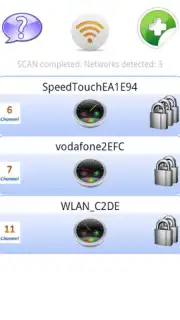
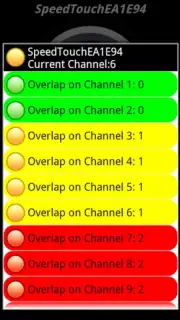
WiFi Optimizer is a diagnostic utility for Android that provides users with a detailed, color-coded analysis of all wireless networks within range. Its primary function is to identify signal conflicts and channel congestion, presenting the data in an immediately actionable format. The application operates by scanning the radio frequency environment and evaluating each detected network against key performance metrics.
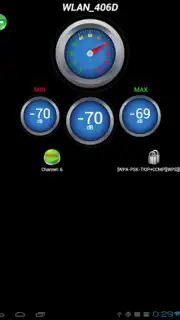
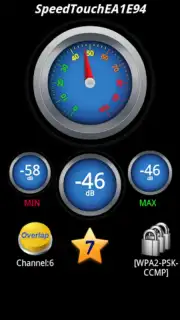
The core mechanic involves the app generating a comprehensive list of available SSIDs, each tagged with a color indicator reflecting its current suitability for a stable connection. This visual system allows for rapid assessment without requiring deep technical knowledge. Selecting any network from the list reveals a deeper diagnostic panel, displaying specific security protocols in use and calculated signal strength parameters. The absence of advertising within the interface ensures an uninterrupted analytical process.
Core Analytical Features
- Perform a Comprehensive Network Audit that scans and lists every WiFi signal detectable by your device, detailing SSID, BSSID, and signal strength.
- Utilize Instant Visual Status Indicators with a three-color system to immediately identify optimal networks and those suffering from interference or poor performance.
- Access Detailed Security and Quality Profiles for any selected network, revealing the encryption type and providing a stability assessment to inform your connection choice.
The tool's value lies in its capacity to move connection decisions from guesswork to data-driven selection. By identifying which networks are on overcrowded channels or have weak security, it enables users to manually connect to the most performant and secure option available. For users managing multiple saved networks or operating in dense urban environments, this analysis can directly contribute to a more consistent and potentially faster browsing experience by avoiding inherently problematic connections.
Get precise control over your wireless connectivity and make informed decisions to enhance your network performance. Download the mobile app now.
Internet required. IAP available.
Information
| Version | 6.25 |
| Developer | Apps RLB |
| Requirements | Android Android + 2.3, 2.3.1, 2.3.2+ |
| Updated | 17.03.2026 |
| Size | 5.39 MB |
| Package | wifi.optimizer.appsrlb |
| Signature | f870fa883146cf301bf2c77cb1ab33fe |


