

ExaGear RPG screenshots (7)



Description ExaGear RPG
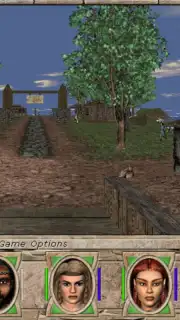
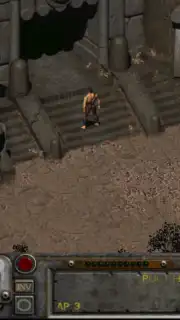
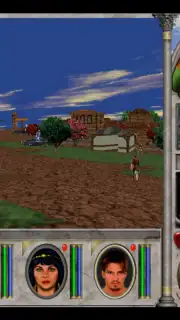
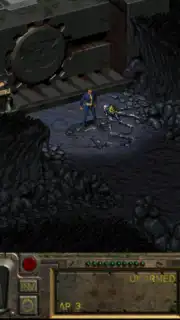
Ever dreamed of reliving the epic computer role-playing games of the 1990s, right from the palm of your hand? What if you could carry the vast, gritty world of Fallout or the magical realms of Might and Magic in your pocket? That nostalgic fantasy is now a tangible reality. ExaGear RPG transforms your Android device into a powerful portal, letting you dive back into the legendary RPGs that defined a generation. This isn't just an app; it's your personal time machine for gaming classics, meticulously engineered to bring complex PC adventures to your touchscreen.
Your Pocket-Sized Gateway to PC Gaming Legends
ExaGear RPG is a specialized emulator designed with one glorious purpose: to run classic Windows-based RPGs on your Android device. Imagine booting up the original Fallout, Fallout 2, or the beloved Might and Magic VI, VII, and VIII during your commute or in a cozy corner of your home. The magic happens by creating a compatible Windows-like environment directly on your phone or tablet. It's important to understand that ExaGear RPG is the engine, not the game library itself. To embark on these adventures, you'll need a legitimate copy of the game files from your own PC collection. This setup ensures you're enjoying the classics you own in a brand new, incredibly portable way.
The process is refreshingly straightforward. Simply copy the entire installed game folder from your computer's hard drive into the dedicated 'ExaGear' folder on your Android device's SD card or internal storage. Once the files are in place, the real customization begins. Before launching your game, you select from one of three pre-configured control schemes. Each layout is intelligently designed with a unique button arrangement tailored for specific types of RPGs, optimizing the touchscreen experience for movement, combat, and inventory management. While these control packs are a premium feature, they are a crucial investment for seamless, enjoyable play, transforming your screen into a versatile virtual gamepad.
Why ExaGear RPG Belongs on Your Device
- Relive iconic 1990s PC RPG classics like Fallout and Might & Magic on Android.
- Utilizes a powerful emulation engine to create a Windows-compatible environment.
- Enjoy a completely ad-free gaming experience for uninterrupted immersion.
- Transfer game files easily via simple copy-paste from your computer.
- Choose from specialized, premium control packs for optimal touchscreen gameplay.
This powerful emulator bridges the gap between desktop nostalgia and mobile convenience. While it requires your own game files and has certain technical considerations, it stands as a remarkable tool for dedicated fans. It unlocks a treasure trove of deep, story-driven experiences that modern mobile games rarely match. Feel the thrill of turn-based combat, get lost in rich dialogue trees, and manage intricate inventories—all from your smartphone. The past has never been more accessible.
Ready to unlock a library of legendary adventures? Download ExaGear RPG now and start your journey today!
Disclaimer: Requires a stable internet connection for initial setup and file management. The app itself contains in-app purchases for control schemes. A legitimate copy of any game software is required to play.
Information
| Version | 2.6.8 |
| Developer | Eltechs |
| Requirements | Android Android + 5.0+ |
| Updated | 17.03.2026 |
| Size | 4.37 MB |
| Package | com.eltechs.erpg |
| Signature | 37c617ec5475ccc5029d9fde98baa2b9 |
| Architecture | armeabi-v7a |


