

Game Booster screenshots (5)




Description Game Booster
Is your phone struggling to keep up with your favorite games and apps, slowing down just when you need performance most? Game Booster addresses a common mobile issue: the gradual accumulation of cached data from regular use, which consumes memory and degrades system responsiveness. This utility application provides a structured method to clear this digital clutter and launch applications under optimized conditions, aiming to restore lost speed and efficiency without manual data management.
Core Functionality and Operational Modes
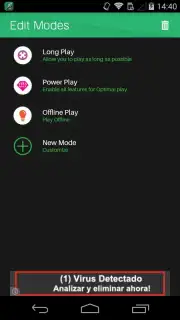
Game Booster operates by integrating cache cleaning with a smart application launcher. The primary action involves selecting a game or app from within the Game Booster interface. The utility automatically clears the associated cache files before launch, attempting to reduce load times and improve in-app performance. This process is designed to be a one-touch solution to prevent system lag. Beyond basic cleaning, the app offers three distinct launch modes, allowing for tailored resource management. Battery Saver mode prioritizes power conservation during use. The Best Performance mode allocates maximum available resources to address speed and loading issues. Offline Mode disables mobile data transmission upon launch, designed to conserve data traffic for selected applications.
Configuration and Extended Use
For users with extensive app libraries, Game Booster supports custom configuration. You can create personalized lists to assign specific launch modes to different applications. This feature enables the utility to handle each app individually, whether it's a demanding game set to Best Performance or a social media app assigned to Battery Saver. Although engineered with resource-intensive mobile games in mind, the tool is applicable to a wide range of everyday applications. Using it to launch standard apps may similarly clear obstructive cached data, potentially enhancing their stability and operational speed.
- Automatically clears app cache before launch to improve loading times and system speed.
- Offers three specialized launch modes: Battery Saver, Best Performance, and Offline.
- Allows creation of custom app lists with individually assigned performance profiles.
- Functions as a universal launcher to optimize both games and daily-use applications.
- Provides a one-tap process to reduce background clutter and reclaim device memory.
We suggest trying Game Booster if you experience slowdowns during mobile gameplay or app use. Consider downloading it for a direct method to manage cache and launch applications under optimized conditions.
Heads up: you'll need wifi for most features. Some cool stuff is extra.
Information
| Version | 1.1.1 |
| Developer | IGNIS AMERICA, INC. |
| Requirements | Android Android + 4.0.3, 4.0.4+ |
| Updated | 17.03.2026 |
| Size | 5.6 MB |
| Package | apps.ignisamerica.gamebooster |
| Signature | 0ffeeb6d078502f82c385d4c7c397cc5 |


