

PojavLauncher (Minecraft: Java Edition) screenshots (8)
Description PojavLauncher (Minecraft: Java Edition)
The Challenge of Mobile Minecraft
For years, Android users seeking the authentic, moddable, and server-rich experience of Minecraft: Java Edition faced a significant barrier: the official version was not available on mobile. While other editions existed, they lacked the depth, community content, and precise control that define the Java version. The problem was finding a reliable, functional, and accessible way to run a full desktop Java application on a touchscreen device without compromising the core gameplay.
A Technical Solution for the Purist
PojavLauncher addresses this gap directly. It is an open-source Android application engineered specifically to launch Minecraft: Java Edition natively. Functioning as a sophisticated compatibility layer, it builds upon the legacy of the discontinued Boardwalk project, revitalizing and expanding the capability to execute the original Java game files on ARM-based Android hardware. The launcher does not provide the game itself; instead, it creates the necessary environment to run your legally acquired Minecraft: Java Edition installation files, transforming your phone or tablet into a portable Java gaming platform.
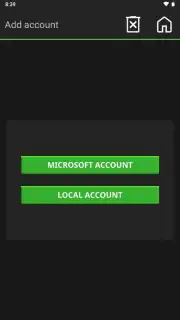
The initial setup process is notably streamlined for such a technical tool. Upon launching the app and selecting "Play," users are presented with two primary account pathways: Microsoft Account and Local Account. The Microsoft Account option is essential for players who wish to join online servers or Realms that require official authentication, allowing continuity from a desktop play session. The Local Account option is ideal for offline, single-player worlds or testing. After this selection and a simple username entry, the launcher handles the backend processes, typically initiating the Minecraft client within seconds.
Core Functionality and Customization
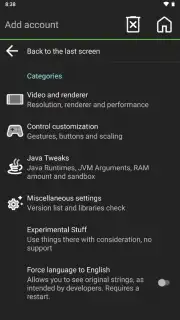
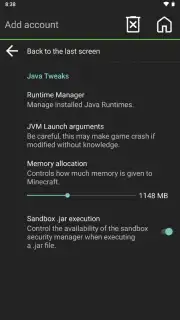
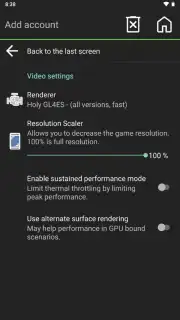
Where PojavLauncher distinguishes itself is in its extensive configuration menu, accessible via the button in the upper-right corner. This panel is where the application transitions from a simple launcher to a powerful tuning utility for mobile hardware. The graphical settings allow for precise adjustment of the game's render resolution, a critical feature for balancing visual clarity with performance on diverse Android devices. The Java settings are equally important, permitting users to allocate specific amounts of RAM to the game, with a default of 1148 MB that can be increased on capable devices for smoother operation with complex mods or resource packs.
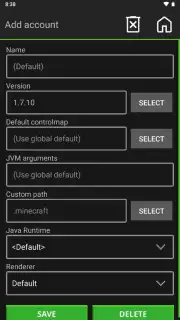
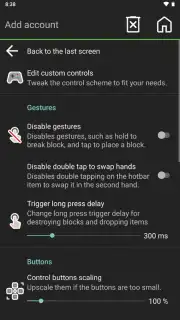
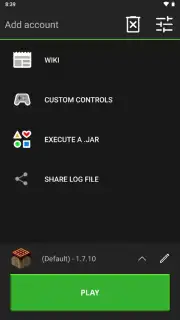
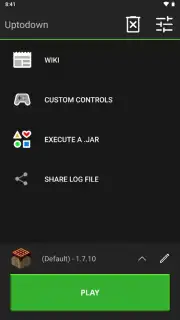
Further options include a dedicated section for experimental performance tweaks, which can help stabilize frame rates. Control customization is comprehensive, offering fully adjustable on-screen touch controls with sensitivity and layout editing, alongside robust support for Bluetooth controllers, providing a console-like experience. Crucially, the launcher supports a vast library of Minecraft versions. It can launch builds from the earliest public alpha, rd-132211 from 2009, up to modern snapshots and releases like 1.19. This is managed either by downloading versions directly through the launcher's interface or by manually loading a specific .JAR file via the "Launch .JAR" option in the main menu, with version 1.7.10 serving as the fallback default.
- Open-Source Java Edition Launcher: Executes the full desktop version of Minecraft: Java Edition on Android devices through a sophisticated compatibility layer.
- Dual-Account System & Quick Start: Supports both Microsoft Account for online play and Local Account for offline, enabling gameplay within seconds of setup.
- Deep Performance Configuration: Offers granular control over graphics resolution, dedicated Java memory allocation, and experimental performance enhancements.
- Extensive Version & Mod Support: Capable of launching virtually any Minecraft version from 2009 alphas to the latest snapshots, facilitating mod and custom jar usage.
- Fully Customizable Control Schemes: Provides editable touchscreen controls with sensitivity adjustments and seamless Bluetooth controller integration.
We suggest trying PojavLauncher if you are a dedicated Minecraft: Java Edition player seeking to extend your building, modding, and server-based gameplay to your Android device without compromise.
Download game now to transform your mobile device into a portable Java Minecraft platform.
Disclaimer: This application requires a legally owned copy of Minecraft: Java Edition. A persistent internet connection is recommended for account authentication, downloading game versions, and online multiplayer. The app may utilize significant processing power, battery, and network data. It involves accessing and modifying game files; users should proceed with caution and at their own risk. Please ensure your device meets the performance requirements for running Java-based applications.
Information
| Version | gladiolus-20250118-c04e3af-v3_openjdk |
| Developer | artdeell |
| Requirements | Android Android + 5.0+ |
| Updated | 17.03.2026 |
| Size | 142.03 MB |
| Package | net.kdt.pojavlaunch |
| Signature | 145a0b31632dba9cf0defa289b3c133f,503f45d5c12396fe60eb17a2313c1d31 |
| Architecture | armeabi-v7a, x86, arm64-v8a, x86_64 |


