

Samsung Game Tools screenshots (3)

Description Samsung Game Tools
Your Samsung Galaxy Just Became a Dedicated Gaming Console
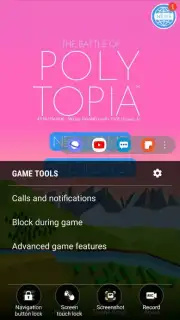
Imagine you're in the final, tense moments of an online match. Your focus is absolute, your thumbs are flying across the screen, and victory is within reach. Then, a notification banner slides down, a call comes in, or your finger accidentally brushes the back button. The immersion shatters, and that hard-fought win slips away. This is the frustration Samsung Game Tools is designed to eliminate. This exclusive utility transforms your Samsung device from a multipurpose phone into a focused gaming powerhouse, but it requires one specific step to activate: you must launch your games through the Samsung Game Launcher hub. Once set up, it layers a suite of enhancements directly over your gameplay, creating a seamless and uninterrupted experience.
The core function is a comprehensive Do Not Disturb mode for gamers. With a simple toggle, you can mute all incoming alerts—from social media pings and messaging apps to system notifications and other game invites. This creates a pure gaming environment where nothing can break your concentration or cause a costly mis-tap at a critical moment. Beyond silencing digital interruptions, the app also masters your device's physical controls. It can temporarily lock the navigation buttons, preventing any accidental presses on the back or recent apps keys. You can tap or swipe over them without fear, ensuring you never get ejected from your session by a clumsy gesture.
Perhaps the most instantly gratifying tool is the integrated capture suite. Floating as a subtle, transparent menu over your game, it provides one-touch access to screenshot and screen recording functions. Capturing a spectacular combo finish or recording a flawless strategy run for your friends requires just a single tap. These files are saved directly to your gallery without any complex menus or shortcuts to remember, making it the most streamlined way to document and share your gaming highlights on Android.
- Block All Game Interruptions: Silences notifications, calls, and alerts to maintain total focus during play.
- Lock Physical Navigation Keys: Prevents accidental touches on back or menu buttons from disrupting your game.
- Instant Capture Overlay: Take screenshots or record high-quality video directly with a floating on-screen menu.
Stop letting distractions dictate your gameplay. Transform your Samsung device into the optimized gaming machine it's meant to be. Download Samsung Game Tools now and reclaim every match!
Heads up: This toolset is integrated within the Samsung Game Launcher ecosystem. You'll need to launch games from the Game Launcher to activate these features, and full compatibility is reserved for supported Samsung Galaxy devices.
Information
| Version | 8.0.02.35 |
| Developer | Samsung Corporation |
| Requirements | Android Android + 15+ |
| Updated | 17.03.2026 |
| Size | 9.8 MB |
| Package | com.samsung.android.game.gametools |
| Signature | d087e72912fba064cafa78dc34aea839 |
| Architecture | arm64-v8a |


