

4G Browser screenshots (7)




Description 4G Browser
Is Your Default Mobile Browser Slowing You Down?
Many users accept the pre-installed browser on their device without question, but what if a simpler, more controlled alternative could enhance your daily browsing? The 4G Browser app presents itself as a focused tool for streamlined web navigation, prioritizing utility over bloat. This review examines its core mechanics, customization depth, and practical performance to determine if it delivers a genuinely optimized experience for the user seeking efficiency.
Core Functionality and User Experience
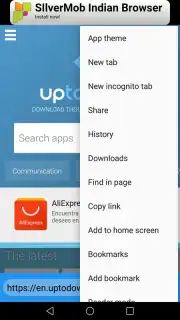
At its foundation, 4G Browser provides a complete and competent web browsing engine. It handles all standard operations you would expect: managing multiple concurrent tabs, creating and organizing bookmarks for quick access to frequented sites, and maintaining a clear, searchable history log. A notable functional addition is the integrated quick-search capability, which can be activated directly from the device's lock screen or home screen widget, bypassing the need to fully open the app for simple queries. The interface philosophy is decidedly minimalist, avoiding visual clutter and excessive graphical elements to keep the focus squarely on page content and speed of navigation.
Depth of Customization and Control
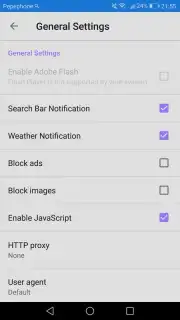
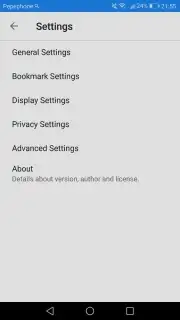
Where 4G Browser distinguishes itself is in its extensive personalization layer. The application is built to be adapted, starting with visual themes that alter the browser's chrome and toolbar aesthetics. More critically, it includes a dedicated ad-blocking tool, a feature that directly impacts data usage, page load times, and overall browsing cleanliness by suppressing intrusive advertisements. This combination of aesthetic and functional tuning allows for a high degree of control over the browsing environment, effectively letting you build a browser that aligns with your specific preferences and needs.
Key Features at a Glance
- Integrated Ad-Blocking Functionality
- Lock Screen Quick Search Access
- Multi-Tab Browsing Management
- Highly Customizable Visual Themes
The app's stated advantage of "Turbo" mode suggests backend optimizations for data compression and loading efficiency, which, when combined with ad-blocking, can contribute to reduced data consumption and faster page rendering, particularly on mobile networks. It is a straightforward, powerful tool for users who prioritize a no-nonsense, configurable, and efficient window to the web on their smartphone.
Get your faster, cleaner browsing experience today.
Download mobile app now
Disclaimer: This application requires an internet connection. Data savings from Turbo mode and ad-blocking may vary based on content and network conditions. Be mindful of data usage charges from your provider. The developer may offer in-app purchases. Please review the app's data collection and privacy practices before use. This product is intended for a general audience.
Information
| Version | 1.1.0 |
| Developer | AyushRock |
| Requirements | Android Android + 4.0, 4.0.1, 4.0.2+ |
| Updated | 17.03.2026 |
| Size | 23.33 MB |
| Package | com.ww4GBrowser_6212082 |
| Signature | 13be4419a67e69605e0331768691fed3 |
| Architecture | armeabi, armeabi-v7a, mips, x86 |


