


Auto Clicker Fast - Auto Tap screenshots (5)

Description Auto Clicker Fast - Auto Tap
Tired of the Grind? Let Your Phone Do the Tapping.
Imagine needing to perform hundreds of repetitive taps for a game, an app, or a task, and your finger just can't keep up. It's tedious, time-consuming, and frankly, not why you got a powerful smartphone. That's where a reliable automation tool steps in, transforming your device from a manual tool into a streamlined, efficient assistant. You get to step back while the automated process handles the monotonous work, freeing you up for what actually matters.
Your Personal Automation Assistant
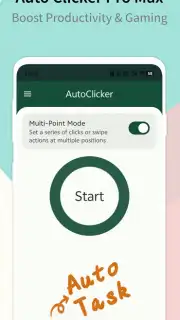
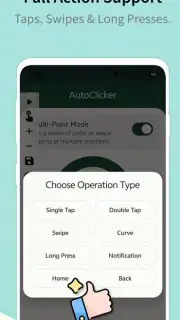
This tool is designed to be both powerful and straightforward. You set up sequences of taps, swipes, or gestures at specific screen locations, and it executes them with precise timing. Whether you're automating a process in a mobile game to collect resources, testing an application's interface, or automating a repetitive social media action, you configure the commands once and let it run. The interface is built for clarity, allowing you to visually place tap points, adjust intervals down to the millisecond, and create complex multi-step scripts without needing to write a single line of code. You control the rhythm, the pattern, and the duration, putting the power of automation directly in your hands.
Why This Tool Feels Effortless
- Intuitive Visual Editor: Place tap markers directly on your screen with a simple tap-and-hold. Seeing the exact coordinates and sequence flow makes setup feel intuitive, not technical.
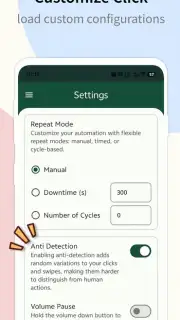
- Highly Customizable Timing: Set delays between actions with precision. Need a rapid-fire burst or a slow, deliberate sequence? You adjust the speed to match the task's exact requirements.
- Multi-Point Command Chains: Go beyond single taps. Create sophisticated scripts involving multiple tap locations, optional swipes, and varied pauses, all within a single automated loop.
- One-Touch Operation: Start or stop your automated sequence with a single, accessible floating button. It gives you immediate control without navigating through menus.
- Lightweight and Responsive: Engineered to run smoothly in the background without lag or significant battery drain, ensuring your device remains responsive for everything else you need to do.
We suggest trying Auto Clicker Fast - Auto Tap to experience how automation can simplify your digital routine. Consider downloading it to reclaim your time and reduce screen fatigue.
Download mobile app now
Heads up: you'll need wifi for the initial download. The core automation features work offline. This is a tool for automating screen interactions; always ensure your use complies with the terms of service of other applications.
Information
| Version | 1.5.4 |
| Developer | itdragon |
| Requirements | Android Android + 9+ |
| Updated | 17.03.2026 |
| Size | 28.62 MB |
| Package | com.itdragon.autoclickerfree |
| Signature | 6c90bf03458966c1e1a860a624dadd10 |
| Architecture | armeabi-v7a, x86, arm64-v8a, x86_64 |


