

BitTorrent Sync screenshots (3)
Description BitTorrent Sync
Imagine needing to access a critical work document from your home computer while you're on the road, or wanting every photo from your phone to instantly appear on your desktop without manually uploading anything. This is the core problem solved by BitTorrent Sync, a peer-to-peer file synchronization tool from BitTorrent Inc. It operates by creating direct, encrypted connections between your devices, bypassing cloud servers entirely for a private and often faster transfer experience.
Core Functionality and Interface Analysis
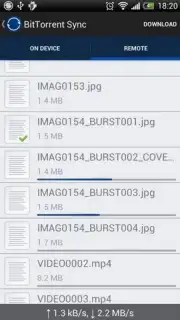
BitTorrent Sync functions as a continuous background utility. After installation on your Android device and desktop PC, you designate specific folders for synchronization. The application then monitors these folders for any changes—new files, modifications, or deletions—and propagates those changes across all linked devices in your private network. The interface is notably minimalistic, focusing on a straightforward list of synced folders and connection status, which reduces setup complexity. A key operational feature is the ability to automate the sync process entirely; for instance, the camera folder on your Android can be set to sync automatically, ensuring every new photo or video is available on your desktop almost immediately after creation.
Detailed Feature Breakdown
The application's value is derived from several specific technical features that differentiate it from conventional cloud services.
- Unlimited file and folder synchronization between an unlimited number of personal devices without imposing storage caps.
- Full automation for media backup, instantly syncing photos and videos captured on your Android to your designated computer folders.
- A completely advertisement-free user experience within the core application interface during standard use.
- Turbo Sync performance enhancement for accelerated transfer speeds when moving large volumes of data or many files simultaneously.
- Direct device-to-device transfer protocol that maintains privacy by keeping files off third-party servers.
The utility is positioned for users who require persistent, automated file mirroring across a personal ecosystem of devices. Its efficiency is most apparent in workflows involving large media files or sensitive documents where cloud upload delays or privacy concerns are a factor.
Download BitTorrent Sync immediately to establish your own private file synchronization network!
Disclaimer: This application requires an active internet connection for device synchronization. Some advanced features may require in-app purchases. Data usage applies during file transfers. Please be aware of the terms of service and privacy policy provided by the developer, BitTorrent Inc. The app may have age restrictions depending on regional guidelines.
Information
| Version | 2.3.9 |
| Developer | BitTorrent Inc. |
| Requirements | Android Android + 4.0, 4.0.1, 4.0.2+ |
| Updated | 17.03.2026 |
| Size | 10.58 MB |
| Package | com.bittorrent.sync |
| Signature | 70148fe06d910f797b828bb0352179e5 |
| Architecture | armeabi, armeabi-v7a, x86 |


