

Chrom Browser screenshots (2)

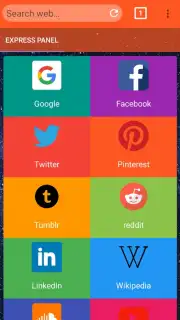
Description Chrom Browser
Imagine a browser that feels less like a tool and more like a natural extension of your intent. You search, it understands; you navigate, it anticipates. This is the experience at the core of Chrom Browser, a project from CMOS Apps designed to strip away the digital friction between you and the information you seek. It moves beyond being a mere window to the web, aiming instead to be a cohesive, intelligent layer that integrates seamlessly into your daily digital routine.
Core Mechanics and User Experience
Chrom Browser is engineered around a philosophy of minimalistic efficiency. The interface presents a clean canvas, dominated by a multifunctional address bar that serves as the primary command center. From here, you can execute rapid searches, navigate to precise URLs, or activate voice commands with minimal taps. The rendering engine is optimized for stability and speed, ensuring that pages load consistently and media content plays without interruption. A core mechanic is its approach to tab management, which utilizes a visually intuitive card-based system, allowing for easy organization and swift switching between multiple browsing sessions. Privacy controls are integrated directly into the main navigation, offering one-tap access to clear browsing data, manage site permissions, and activate a simplified tracking blocker.
Key Functional Advantages
The application distinguishes itself through a deliberate focus on user-centric performance and unobtrusive utility. The design avoids visual clutter, promoting focus on content rather than browser chrome. Performance optimizations are tailored for a wide range of devices, aiming to reduce memory footprint and battery consumption during prolonged use. It provides a highly customizable start page, where users can pin their most-visited sites and access bookmarks without navigating through menus. The synchronization feature, while streamlined, allows for a basic transfer of bookmarks and settings across devices using a user account, creating a lightweight continuum of your web environment.
- Intelligent Omnibox: A unified bar for searching, navigating, and issuing voice commands instantly.
- Optimized Page Rendering: A stable engine for fast loading and reliable media playback on diverse sites.
- Visual Tab Management: Organize and flip through open pages using an intuitive card-stack interface.
- Integrated Privacy Tools: Quick-access controls for clearing data and managing site permissions.
- Customizable Start Page: Design your launchpad with pinned favorite sites and immediate bookmark access.
Exclusive access for the first wave of users: experience this streamlined approach to browsing today. Download Chrom Browser now and configure your efficient, personal web portal.
Disclaimer: Chrom Browser requires an internet connection. This product is offered by CMOS Apps and is not affiliated with or endorsed by any other entity. Features are subject to change. Data usage applies. Please review the app's permissions and privacy policy upon installation. Parental guidance is advised.
Information
| Version | 1.0 |
| Developer | CMOS Apps |
| Updated | 17.03.2026 |
| Size | 20.49 MB |
| Package | com.ChromBrowser8257223 |
| Signature | ffc26fe214480e44169cc71de7b18dfa |
| Architecture | armeabi, armeabi-v7a, mips, x86, arm64-v8a, x86_64 |


