

Cloud Print screenshots (5)
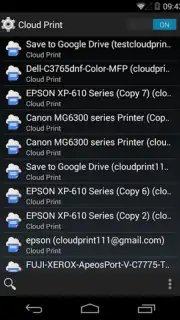
Description Cloud Print
A Practical Solution for Mobile Printing
The need to print a document often arises at the most inconvenient times—when you're away from your desk or your computer is off. Google's Cloud Print application addresses this specific workflow interruption by creating a direct bridge between your Android device and printers registered with the Google Cloud Print service. This system eliminates the traditional requirement for a computer to act as an intermediary, transforming printing into a task that can be initiated and managed entirely from a smartphone or tablet, regardless of your physical location relative to the printer.
Core Functionality and Operational Analysis
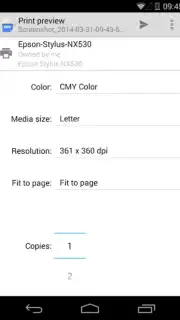
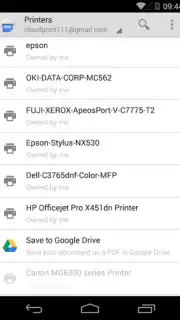
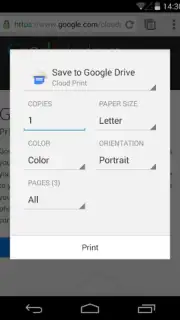
The application operates by leveraging the Google Cloud Print infrastructure. Users must first link their compatible printers to the service, which can include both classic USB printers connected to a computer acting as a host and modern cloud-ready printers with direct internet connectivity. Once configured, the app provides a unified interface for sending documents, photos, and web pages from the Android device to any of these registered printers. The process involves selecting the document, choosing the target printer from a managed list, and adjusting basic print settings before submission.
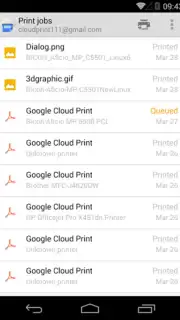
A key operational feature is the print job management queue. After sending a file, users can monitor its status in real-time, confirming successful processing or identifying any errors that may have occurred during transmission or at the printer itself. This visibility is crucial for remote management, providing assurance that a critical document has been sent correctly to a home or office printer. The application supports management of multiple printers, allowing for logical organization—such as designating devices for personal or professional use—and selection of the most appropriate one for each task.
- Enables direct wireless printing from Android to Google Cloud Print-registered devices.
- Provides real-time status tracking and management for all submitted print jobs.
- Supports centralized control over multiple printers, both classic and cloud-ready models.
- Facilitates printing from various sources without requiring an intermediary computer.
- Offers a streamlined, ad-free user interface for reliable and quick document handling.
Stop complicating your workflow with cables and computer dependencies. Transform your Android device into a universal print command center today.
Download the Cloud Print mobile app now and start printing from anywhere!
Note: This application requires an internet connection for initial printer registration and cloud communication. Printer compatibility and feature availability may vary. The service is provided by Google Inc.
Information
| Version | 1.47 |
| Developer | Google Inc. |
| Requirements | Android Android + 4.1, 4.1.1+ |
| Updated | 17.03.2026 |
| Size | 3.23 MB |
| Package | com.google.android.apps.cloudprint |
| Signature | d046fc5d1fc3cd0e57c5444097cd5449 |
| Architecture | universal |


