

Comodo Backup screenshots (4)
Description Comodo Backup
Never Lose a File Again. Secure, Automated Backup for Your Entire Android Device.
Comodo Backup provides a professional-grade data protection solution engineered for the mobile environment. This tool creates encrypted, compressed backups of your contacts, messages, call logs, calendar events, and media files. It operates on a set-and-forget principle, allowing you to schedule automatic backups to your preferred destination without manual intervention. The application utilizes strong encryption standards to ensure your personal archives remain private and inaccessible to unauthorized parties.
Core Functionality and Operational Modes
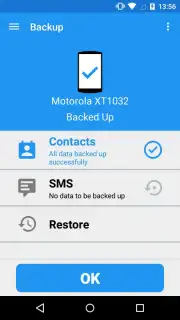
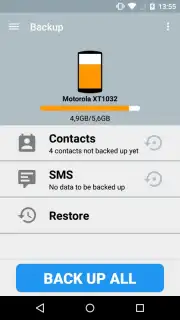
The application is built around a centralized dashboard for managing all backup and restore operations. You can configure multiple, independent backup jobs for different data types, each with its own schedule and storage target. A dedicated restore module lets you browse backup archives by date and data category, enabling selective recovery of individual items or complete datasets. The system includes a verification process to confirm the integrity of each backup upon completion.
Key Technical Advantages
- Flexible Storage Targets: Direct backup to SD card, internal device storage, or configured network locations via WebDAV for off-device security.
- Granular Scheduling Engine: Set precise automatic backup intervals—daily, weekly, or monthly—at a time of your choosing to avoid device usage peaks.
- Military-Grade Encryption: Protect your archives with AES-256 bit encryption during both the creation and storage phases, requiring a password for access.
Exclusive access for first users: Download the Comodo Backup mobile app now and configure your first automated, encrypted backup today only. Establish your data safety protocol before your next critical update.
This application requires an internet connection for initial download, activation, and for utilizing network-based storage features. The core backup and restore functionality to local storage operates independently. The developer may offer additional premium features via in-app purchases.
Information
| Version | 3.4.00001 |
| Developer | Comodo Security Solutions |
| Requirements | Android Android + 4.0, 4.0.1, 4.0.2+ |
| Updated | 17.03.2026 |
| Size | 3.15 MB |
| Package | com.comodo.cisme.backup |
| Signature | a506b960c0ead2e79ce28e00e797d7fa |
| Architecture | universal |


