

Control Center iOS 17 screenshots (5)
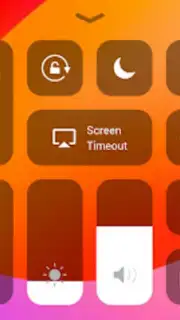




Description Control Center iOS 17
What if your Android device could borrow the sleek, immediate control of an iPhone?
While Android offers deep customization, its quick settings panel can sometimes feel fragmented compared to the cohesive, gesture-driven Control Center found on iOS 17. This application bridges that gap, not through imitation, but through intelligent adaptation. It reconstructs the iOS 17 Control Center experience as a fully functional overlay and widget system for Android, delivering a distinct paradigm of quick-access controls. The goal is to provide a different kind of organizational efficiency—one centered on large, tactile toggles and a consolidated menu that feels both familiar to iOS users and refreshingly streamlined for Android enthusiasts seeking a new interface rhythm.
Features / Core Mechanics
The app operates as a persistent service that places a dynamic control panel within easy reach. Activation is typically handled through a configurable gesture—like a swipe from the top or bottom corner—or a tap on a floating bubble, summoning the translucent interface over any active application. The core mechanics involve a modular system where each control tile is not just a static shortcut but an interactive hub. Pressing and holding on a tile, such as the connectivity module, doesn't just toggle Wi-Fi; it expands in-place to reveal a sub-menu for selecting networks, activating Bluetooth, or managing a personal hotspot without launching a separate system settings page. This layered interaction minimizes navigation hops and keeps focus on the immediate task.
Visual and haptic feedback are calibrated to emulate the precise, damped response of the iOS system, creating a sensory experience that reinforces the feeling of direct manipulation. The app doesn't replace your Android system settings; it creates a parallel, highly efficient command layer. Users can arrange tiles in a fixed grid, grouping audio controls, smart home switches, and media playback into personalized clusters. The background dynamically blurs whatever content is beneath it, ensuring readability while maintaining context, a detail that highlights the app's focus on seamless integration rather than obtrusive overlay.
Key Advantages
- Modular Tile Customization: Drag, drop, and resize a library of control tiles for connectivity, media, smart home, and system utilities to build your perfect layout.
- In-Place Expanded Controls: Press and hold any widget to access advanced settings and sub-options directly within the overlay, eliminating disruptive app switching.
- High-Fidelity Visual Design: Experience pixel-sharp icons, smooth animations, and authentic blur effects that create a visually cohesive and premium interface layer.
We suggest trying Control Center iOS 17 to experience a meticulously crafted alternative control scheme that prioritizes fluid access and visual clarity. Consider downloading it if you appreciate interface design that values both form and instantaneous function.
Requires a stable internet connection for initial setup and certain widget functions. The app may offer optional in-app purchases for advanced theme packs or additional tile modules.
Information
| Version | 3.3.2 |
| Developer | Launcher iOS Team |
| Requirements | Android Android + 7.0+ |
| Updated | 17.03.2026 |
| Size | 11.79 MB |
| Package | com.controlcenterios.iphone |
| Signature | 5994bc9188db1df72148e8cedcb524fb |
| Architecture | armeabi-v7a, arm64-v8a |


